Fix Unnecessary React Re-Renders in a Chat UI
An LLM streams tokens and React repaints your whole chat history on every one. How to keep the message list still while a single reply streams in.

The bug does not show up in the demo. You wire a chat box to a streaming endpoint, tokens land, text appears, and it looks fine because the conversation is three messages long. Then someone has a real session with forty messages and a couple of long code blocks, and the whole thing starts to stutter. Typing in the input lags, the scroll jumps, and the fans spin up. Nothing crashed; it just feels cheap.
This post is for React developers wiring up an LLM chat and wondering why a screen full of text gets slow. The fix is not a faster Markdown parser. It is deciding which component owns the text that changes. I’ll show the layout that causes the slowdown, then three fixes in order of impact (move the streaming state down, memoize finished messages, batch how often you paint), and finally the problems that survive all three.
I hit this building the chat side of Archi, the RAG (retrieval-augmented generation) copilot for CMS operations, and again on CloudCanvasAI, where a Claude reply streams next to a live document preview. The cause was the same both times. A model streamed forty or fifty tokens a second, and the component tree was arranged so that every one of those tokens re-rendered the entire message history.
Why streaming is the worst case for React
Most React performance advice is about a click that updates some state. A click is one render, and nobody notices one render, even a wasteful one. Streaming breaks that assumption because the update is not one event; it is a firehose. A single model response fires a state update per chunk, chunks arrive faster than the eye can track, and each update is a full trip through React’s render and commit cycle.
When a component’s state changes, React re-renders that component and, by default, every component below it. That is the part people forget. Rendering a component does not mean touching the DOM. It means calling the component function again and diffing the result against the previous one. That is usually cheap, and for one click it is invisible. Do it fifty times a second with a growing subtree underneath, and the cost is no longer invisible.
Here is the arrangement that causes it. It is the obvious one to write first:
function ChatApp() {
  const [messages, setMessages] = useState([]);
  const [streaming, setStreaming] = useState("");

  async function send(prompt) {
    setMessages((m) => [...m, { role: "user", text: prompt }]);
    let acc = "";
    for await (const token of streamCompletion(prompt)) {
      acc += token;
      setStreaming(acc);          // fires ~50x/sec
    }
    setMessages((m) => [...m, { role: "assistant", text: acc }]);
    setStreaming("");
  }

  return (
    <div className="chat">
      {messages.map((m, i) => <Message key={i} {...m} />)}
      {streaming && <Message role="assistant" text={streaming} />}
      <Composer onSend={send} />
    </div>
  );
}
The streaming string lives in ChatApp, the component that renders the whole list. Follow one token through it:
setStreamingre-rendersChatApp.ChatAppre-renders every entry inmessages.- Every finished message re-parses its Markdown.
- React’s reconciler (the diffing step) walks the whole result.
The forty messages that have not changed since last Tuesday get rebuilt fifty times a second, just because they happen to be siblings of the one that is changing.
The diagram below tells the whole story. The tree is the same on both sides; the only difference is which component holds the fast-changing string.
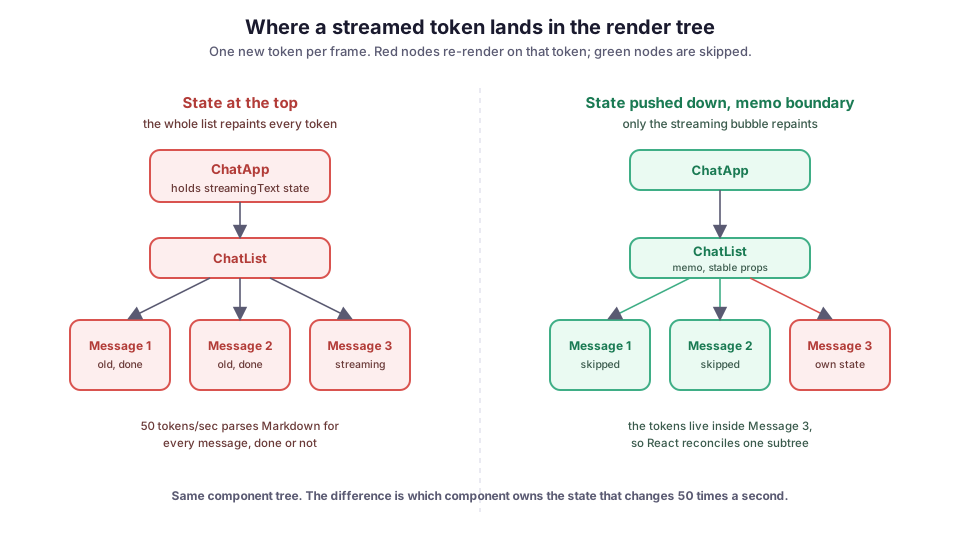
Fix 1: move the fast-changing state down
The change that buys the most is to stop keeping the streaming text in a component that also renders the history. Give the in-flight message its own component that owns its own text, and let the token loop update that component instead of the parent:
function StreamingMessage({ stream }) {
  const [text, setText] = useState("");

  useEffect(() => {
    let acc = "";
    let cancelled = false;
    (async () => {
      for await (const token of stream) {
        if (cancelled) return;
        acc += token;
        setText(acc);
      }
    })();
    return () => { cancelled = true; };
  }, [stream]);

  return <Message role="assistant" text={text} />;
}
Now setText re-renders StreamingMessage and nothing above it. ChatApp renders once when the response starts and once when it finishes. The forty old messages are not in this component’s subtree, so React never revisits them while tokens fly. This change alone took Archi’s chat from visibly janky in long sessions to fine, before I touched memoization at all. State placement is the fix; everything after this is cleanup.
Notice the cancelled flag in the effect’s cleanup. If the component unmounts mid-stream, or stream changes, you do not want a dead async loop still calling setText. That is a smaller cousin of the problem I covered in cancelling an LLM stream with AbortController, which you also want so that the network request itself stops, not just the state writes.
Fix 2: draw a memo boundary around finished messages
Moving state down fixes the streaming message. A second, quieter version of the same waste remains: when a new message is appended, ChatApp re-renders and rebuilds every existing Message, even though only one was added. For a plain text bubble that costs nothing. For a message that runs Markdown through a parser and highlights code, rebuilding thirty of them on every append is real work.
React.memo is the tool here. It wraps a component so React skips re-rendering it when its props are the same as last time. It compares them shallowly, which for objects and functions means by reference.
const Message = React.memo(function Message({ role, text }) {
  return (
    <div className={`bubble ${role}`}>
      <Markdown>{text}</Markdown>
    </div>
  );
});
Memo helps only if the props are actually stable between renders, and this is where people wire it up and see no change. Watch for two traps:
- A fresh object or array literal as a prop. A new literal on every render is never shallow-equal to the last one.
- An inline callback such as
onCopy={() => ...}. It is a brand-new function identity on every parent render, which defeats the comparison.
Wrap handlers you pass down in useCallback and derived objects in useMemo so their identity is stable. Otherwise the memo you added is just an extra comparison that always fails.
The key matters too. Keying list items by array index means React reuses the wrong instance when the list changes, and memo compares against the wrong previous props. Use a stable id per message, generated when you create the message, not the index.
Fix 3: batch the tokens you actually paint
Even with state pushed down, you may not want to render on literally every token. Some models emit tiny fragments, and you can get a hundred setState calls a second. React 18 batches updates that happen in the same tick, but an await between tokens puts each one in its own tick with its own render (see React’s note on automatic batching). The screen cannot show more than the display refresh rate anyway, usually sixty frames a second, so painting more often than that is pure waste.
Coalescing with an animation frame caps renders at the refresh rate while still accumulating every token. The hook below schedules at most one flush per frame, and flush paints only if new text arrived since the last paint:
function useStreamedText(stream) {
  const [text, setText] = useState("");
  useEffect(() => {
    let acc = "", raf = 0, dirty = false;
    const flush = () => { raf = 0; if (dirty) { setText(acc); dirty = false; } };
    (async () => {
      for await (const token of stream) {
        acc += token;
        dirty = true;
        if (!raf) raf = requestAnimationFrame(flush);
      }
      flush();          // paint the tail
    })();
    return () => { if (raf) cancelAnimationFrame(raf); };
  }, [stream]);
  return text;
}
The accumulator acc never drops a token; it just decouples how often you receive from how often you paint. The final flush() after the loop matters, because the last few tokens may arrive between frames and you do not want the message to end one word short. If you prefer not to manage frames by hand, useDeferredValue lets React drop intermediate values under load and render the latest. That gets you most of the way with less code.
Where it still bites
The re-render fixes are the easy part. The failures that ate most of my time were the ones that survive them.
Auto-scroll fights the user. Chat UIs pin to the bottom as tokens arrive, and if you scroll to the bottom on every token, a user who scrolls up to read something gets yanked back down mid-sentence. Auto-scroll only when the view is already near the bottom, checking scrollHeight - scrollTop - clientHeight against a small threshold before each scroll. Stop entirely once the user scrolls away.
Code highlighting is the real cost, not Markdown. Parsing Markdown is cheap, but running a syntax highlighter over a growing code block on every frame is not, because it re-tokenizes the entire block each time. During streaming I render code as plain monospace text and highlight it only once the message is complete. Nobody reads syntax colors on half-written code anyway.
Layout thrash from the growing bubble. As the message grows it reflows, meaning the browser recomputes its layout. If anything reads layout properties between writes (measuring height for scroll math, say), you can force a synchronous layout on every frame. Measure in the animation frame callback, not in the middle of the token loop.
Memo hides stale text if you mutate. React.memo compares props by reference. If you push tokens by mutating an existing message object instead of creating a new one, the reference does not change, so memo sees “same props” and the bubble freezes while the data underneath moves. Always produce a new object for the message you are updating (the same discipline as setMessages((m) => [...m]) over m.push), and treat state as a snapshot, the mental model that keeps it straight.
What I would do differently
On the first version of Archi’s chat, I reached for memoization first. I sprinkled React.memo and useMemo around and measured almost no improvement, because the streaming state was still at the top and re-rendering everything regardless. The lesson that stuck: fix where the state lives before you optimize how components compare. Component placement decides how big the re-render blast radius is; memo only trims the edges of whatever radius you already have. If the profiler shows a wide flame graph on every token, no amount of useCallback saves you. Move the state down first, confirm in the React Profiler that the blast radius shrank, and reach for memo only for the append case that is left.
The other thing I would do sooner is virtualize the list once sessions get genuinely long, meaning render only the messages in the visible window. Past a few hundred messages, even skipped renders add up because the components are still in the tree, and something like react-window keeps the cost flat. I did not need it for typical operator sessions in Archi, so I left it out, but it is the next lever if your conversations run long.
This is the frontend companion to the parsing side I covered in streaming LLM Markdown without flicker. That post is about not re-parsing text you already parsed; this one is about not re-rendering components that did not change. The two stack. Get the state placement right, draw a memo boundary around the finished history, and cap your paint rate at the refresh rate. Do all three, and a forty-message session with live tokens stays as smooth as the three-message demo. The trick was never a faster parser. It was being deliberate about which component owns the string that changes fifty times a second.
Diagram by M. Hassan Ahmed, released under CC0. No external image was used for this post; the figure is original work by the author.