Cancelling an LLM Stream in React with AbortController
A user hits stop or switches chats and the old LLM stream keeps writing tokens and running up cost. How to cancel a streaming fetch in React the right way.

A user clicks a different conversation, hits the stop button halfway through a long answer, or just navigates away. The LLM stream you started is still open and still appending tokens, and on a metered model it is still spending money. The naive React fetch has no idea any of that happened.
This post is for frontend engineers building a chat UI on top of a streaming endpoint. The last post covered how to render streaming Markdown without flicker as tokens land in the browser; this one is about stopping. I ran into every version of the problem building the split-panel chat in CloudCanvasAI, where switching documents mid-generation used to leave a ghost stream writing into a panel nobody was looking at. I hit it again in the Archi copilot, where an operator would fire a question, realise it was wrong, and ask another one before the first finished.
The browser’s tool for this is AbortController, an object that lets you cancel a fetch after it has started. But “call .abort()” is only about a third of the real answer. The other two thirds are where people leak: cleaning up when the component unmounts, and stopping the server from generating, not just the browser from listening.
Three moments when a stream must stop
A chat stream needs to be cancellable at three points, and they are easy to conflate:
- Stop button. The user is done with this answer. Kill the current request, keep the conversation.
- Switch context. The user clicks another chat, or another document. The old request is now irrelevant, and worse, its tokens must not land in the new view.
- Unmount. The component goes away: route change, tab close, logout. Anything still holding a reference to that stream is now a leak.
The stop button is the obvious one, and the one most tutorials cover. The other two are where the bugs live, because they fail quietly. Nobody files a report that says “a chat I closed kept costing money.”
The version that leaks
Here is the shape almost everyone writes first: a fetch to a streaming endpoint (the FastAPI SSE post covers the server side), then a loop that reads chunks from the response’s readable stream:
async function streamChat(prompt, onToken) {
  const res = await fetch('/api/chat', {
    method: 'POST',
    headers: { 'Content-Type': 'application/json' },
    body: JSON.stringify({ prompt }),
  });

  const reader = res.body.getReader();
  const decoder = new TextDecoder();

  // Nothing here can be interrupted from the outside.
  while (true) {
    const { value, done } = await reader.read();
    if (done) break;
    onToken(decoder.decode(value, { stream: true }));
  }
}
This works in the demo, but it has no off switch. Once the while loop starts, only the server closing the stream can end it. There is no handle to hang a cancel on, so the stop button has nothing to call. When the component unmounts, the loop keeps running against a callback that now writes into unmounted state. React will warn about that in development. In production it just quietly does the wrong thing.
Giving the stream an off switch
AbortController gives you that handle. You create one, pass its signal to fetch, and call abort() later. That makes both the in-flight request and the pending reader.read() reject with a DOMException named AbortError:
async function streamChat(prompt, onToken, signal) {
  const res = await fetch('/api/chat', {
    method: 'POST',
    headers: { 'Content-Type': 'application/json' },
    body: JSON.stringify({ prompt }),
    signal,
  });

  const reader = res.body.getReader();
  const decoder = new TextDecoder();

  try {
    while (true) {
      const { value, done } = await reader.read();
      if (done) break;
      onToken(decoder.decode(value, { stream: true }));
    }
  } catch (err) {
    if (err.name === 'AbortError') return; // expected, not a failure
    throw err;
  }
}
Two details trip people up:
- The abort surfaces as a thrown
AbortError, and that is not a bug. It is the success path for a cancel. If you let it bubble into your generic error handler, you will flash a red “something went wrong” toast every time someone hits stop. Catch it by name and swallow it, as thecatchblock above does. - Passing
signaltofetchis what tears down the network connection. Just stopping the loop is not enough. That distinction is the whole back half of this post.
The React lifecycle: one controller per request
In a component, the controller has to outlive the function that started the stream, and both the stop button and the cleanup code need to reach it. A ref holds it:
import { useRef, useState, useEffect } from 'react';

function useChatStream() {
  const [text, setText] = useState('');
  const [streaming, setStreaming] = useState(false);
  const controllerRef = useRef(null);

  const send = async (prompt) => {
    // A new send cancels whatever was still running.
    controllerRef.current?.abort();

    const controller = new AbortController();
    controllerRef.current = controller;
    setText('');
    setStreaming(true);

    try {
      await streamChat(prompt, (chunk) => {
        setText((prev) => prev + chunk);
      }, controller.signal);
    } finally {
      // Only clear if this is still the active controller.
      if (controllerRef.current === controller) {
        setStreaming(false);
        controllerRef.current = null;
      }
    }
  };

  const stop = () => controllerRef.current?.abort();

  // Unmount: kill any live stream.
  useEffect(() => () => controllerRef.current?.abort(), []);

  return { text, streaming, send, stop };
}
With the controller in a ref, each cancel point becomes a line or two:
- Stop: the
stopfunction just aborts the current controller. - Unmount: one
useEffectwith an empty dependency array, whose teardown aborts. - A new prompt:
sendaborts the previous controller before creating a new one. A fast user firing two prompts in a row does not end up with two live streams writing into the sametext.
The controllerRef.current === controller check in the finally block is not paranoia. By the time an aborted stream unwinds, send may already have run again and installed a newer controller. Without the guard, the old request’s finally would flip streaming back to false and null out the ref belonging to the new, still-running request. It is the same class of stale-closure bug (a callback acting on values captured from an earlier run) that the React docs call out for effects that fetch, just moved into an async callback.
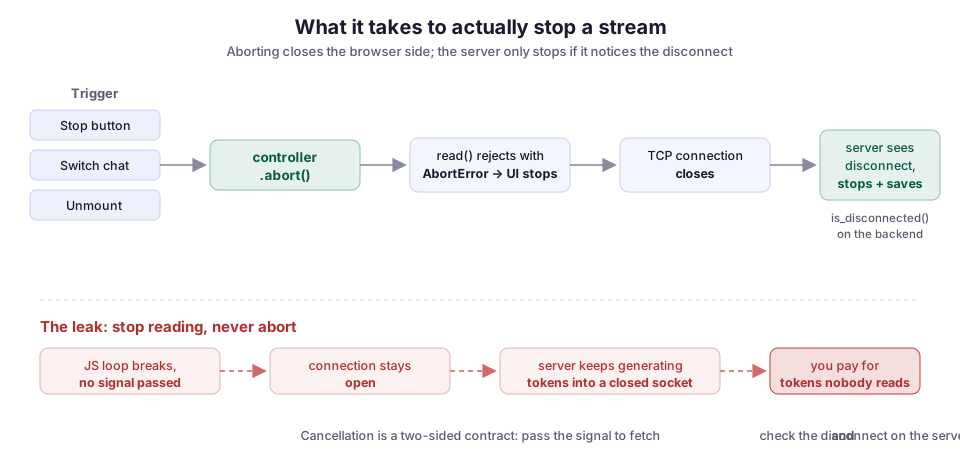
The stale-token race nobody tests for
Aborting stops the old stream from continuing. It does not stop a chunk that was already in flight when you aborted from landing in your state.
Picture the switch-context case. The user is on chat A, a token arrives, and you call setText. Then they click chat B, so you abort A and start B. There is a window where A’s last decoded chunk is sitting in a microtask, about to call the setText you handed it. That setText is closed over chat A’s state, but the screen is showing chat B.
Abort alone will not save you here, because the chunk was read before the signal fired. You need a second guard: tag each request, and check the tag before you write. A monotonic id (a counter that only goes up) is enough:
const activeId = useRef(0);

const send = async (prompt) => {
  controllerRef.current?.abort();
  const id = ++activeId.current;      // this send owns id
  const controller = new AbortController();
  controllerRef.current = controller;

  await streamChat(prompt, (chunk) => {
    if (id !== activeId.current) return;   // a newer send took over; drop it
    setText((prev) => prev + chunk);
  }, controller.signal);
};
Every send bumps activeId. The token callback checks that its captured id is still the active one before it touches state. A late chunk from an abandoned request sees a mismatch and gets dropped on the floor. This is the ignore-flag pattern from the React data-fetching docs, applied per chunk instead of once per response, because a stream has many arrival points rather than one.
Does the server actually stop?
This part surprised me the first time I watched the billing. On the browser side everything looked cancelled: the loop ended, the UI froze the answer, and the error toast stayed away. But the token meter kept ticking for another few seconds. The frontend had stopped listening. The backend had not stopped talking.
Aborting a fetch closes the underlying connection. Whether that stops generation depends entirely on your server noticing and reacting. In FastAPI/Starlette, a client disconnect eventually cancels the task running your streaming generator, and you can also check for it explicitly with await request.is_disconnected(). But if that generator is itself awaiting an upstream model API, closing the browser connection does nothing to that upstream call unless you propagate the cancellation. In this version, the generator checks for a disconnect before it yields each token:
from fastapi import Request

@app.post("/api/chat")
async def chat(request: Request, body: ChatIn):
    async def gen():
        async for token in model.stream(body.prompt):
            if await request.is_disconnected():
                break            # stop pulling from the model, close the upstream call
            yield token
    return StreamingResponse(gen(), media_type="text/event-stream")
The is_disconnected check is what turns a browser abort into a real stop. Without it, the generator keeps pulling tokens from the model and discarding them into a closed socket, which is the worst of both worlds: you pay for tokens nobody reads. This is the same event-loop cooperation I wrote about in why one blocking call stalls a FastAPI stream: cancellation only works if every await in the chain agrees to be cancelled.
If you stream through a provider SDK, check whether its streaming call honors your cancellation. Most of the Python async clients tie into asyncio task cancellation, so breaking out of the async for and letting the context manager close is usually enough to end the upstream request. Verify it against your bill, not against the docs.
If you use EventSource instead of fetch
If your client uses the browser’s EventSource API instead of fetch, none of the AbortController code applies. EventSource has no signal. You cancel it by calling source.close(), which closes the connection the same way an abort does.
The catch is that EventSource can only issue GET requests and cannot set an Authorization header. That is why chat UIs that need a POST body or a bearer token end up on fetch plus a manual reader anyway. If you are on EventSource, the lifecycle is identical: one instance per request in a ref, and close() on stop, switch, and unmount. Only the cancel call changes.
Failure modes
A few things that bit me, or that I have watched bite other people:
- Treating
AbortErroras an error. Catch it by name and return quietly. A stop click should not look like a crash. - StrictMode double-abort. In development, React runs effects twice to surface cleanup bugs, so an effect that starts a stream and aborts on cleanup will abort immediately on mount. That is React telling you the cleanup works. Drive streams from an event handler like
send, not from a mount effect, and it is a non-issue. - Aborting but not guarding. Abort stops future tokens, not the one already decoded. Keep the request-id check even after you add abort, because the two solve different halves of the problem.
- Frontend-only cancel. The browser stops reading, but the server keeps generating. Wire the disconnect check on the backend and confirm it against real token usage.
- Reusing a controller. An
AbortControlleris single-use: once aborted, its signal stays aborted forever, so handing the same controller to a secondfetchstarts it already cancelled. Make a new one per request.
What I would do differently
The first version of this in CloudCanvasAI put everything (fetch, reader loop, abort, state) directly in the component. It worked, and it was unreadable. Now I would start with the version above: a useChatStream hook that owns the controller ref and the active id. The component gets text, streaming, send, and stop, and never touches an AbortController directly. Everything cancellable lives in one place, which is exactly where you want it when the fifth edge case shows up.
The one thing I would add earlier next time is the server-side disconnect check. Its absence is invisible until you look at a usage graph, and by then you have shipped a UI that cancels beautifully on screen and quietly bills for work it threw away. Cancellation is a two-sided contract, and the browser holds only one side of it.
If you are building an LLM chat frontend, most of these patterns came from the streaming side of CloudCanvasAI and Archi. The render-without-flicker post covers the other half of the same UI.
Diagram by M. Hassan Ahmed, released under CC0 (public domain).