Streaming LLM Markdown in React Without Flicker
LLM tokens arrive one at a time, and re-parsing Markdown on every token flickers and drags. How to render streaming Markdown in React without the jank.

When an LLM streams its answer into a chat UI, the browser receives the text a few tokens at a time, and the model is usually writing Markdown. Rendering a finished Markdown document is a solved problem. Rendering a string that grows by a few characters every few milliseconds is not, because for most of the response that string is not valid Markdown yet:
- A code fence is open but not closed.
- A bold marker has one
*but not its partner. - A link has
[text](and no URL.
Render that naively and the message area flickers between raw syntax and formatted output. On a long answer, the whole thing also starts to lag.
This post is for frontend engineers building an LLM chat UI in React. I hit every one of these problems building the split-panel chat in CloudCanvasAI, where you watch a document take shape on the right as Claude writes it on the left, and again in the Archi copilot at CERN. I will show why the naive version is both slow and ugly. Then I’ll walk through the two fixes that matter (parse less often, and parse smarter), how to stop half-written syntax from flickering, and why you should sanitize what the model writes.
Most of my earlier posts covered the backend: how to stream tokens out of FastAPI over SSE (Server-Sent Events), how the agent tool loop decides when to stop, and how one blocking call stalls the event loop. This post is the other end of that wire. The tokens have arrived in the browser, and now you have to render them.
The naive version, and why it breaks
You have an SSE stream (the backend post shows where it comes from). Each message appends a token to a string, and you pass that string to react-markdown:
import ReactMarkdown from 'react-markdown';
import remarkGfm from 'remark-gfm';

function Message({ content }) {
  return (
    <ReactMarkdown remarkPlugins={[remarkGfm]}>{content}</ReactMarkdown>
  );
}
content updates on every token. This works, and on a two-line answer you will never notice a problem. As the answer gets longer, two things go wrong.
The first is cost. react-markdown does not diff: it never compares the new string with the old one to update only what changed. Every time content changes, remark (the parser react-markdown uses) parses the entire accumulated string into an AST, or abstract syntax tree. react-markdown then rebuilds the element tree from scratch. Token 1 parses 4 characters. Token 500 parses the whole 2,000-character answer. Because you repeat that on every token, the total work over a full response grows with the square of its length. A 4,000-token answer is not twice the work of a 2,000-token one; it is four times. You feel it as the cursor stuttering near the end of a long reply.
The second is flicker. A CommonMark parser (CommonMark is the standardized Markdown spec) is deterministic, but its output for a prefix of a document is not its output for the whole document. Mid-stream, the string Here is the code: ``` is a paragraph containing two backticks, so react-markdown renders literal backticks. A few tokens later, the third backtick and a newline arrive. The same leading text is now the start of a fenced code block, and the DOM snaps to a grey code box. The user sees the text jump from one layout to another, and on a response full of code and lists it jumps the whole way down.
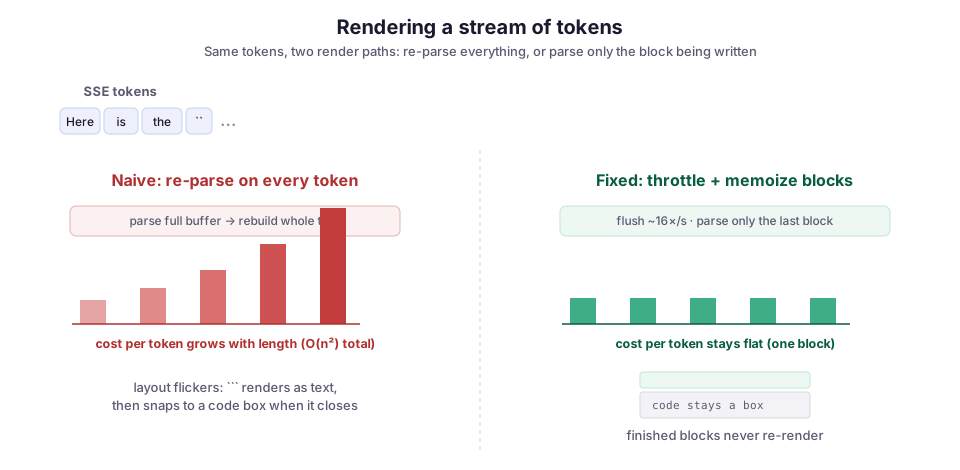
Neither problem is react-markdown’s fault. It renders the string you gave it, as often as you changed it. Both fixes come down to asking it for less.
Fix one: parse less often by throttling updates
Tokens arrive faster than anyone can read, so there is no reason to re-render on every one. A person reads somewhere around 4 to 8 words a second; the model might emit 50 tokens a second. Batch the tokens and flush them on a timer instead of on arrival.
Keep the live text in a ref, which holds a value without triggering a render when it changes, and copy it into state on an interval:
import { useEffect, useRef, useState } from 'react';

// `pending` accumulates every token; `text` is what we actually render.
function useThrottledStream(interval = 60) {
  const pending = useRef('');
  const [text, setText] = useState('');

  const push = (chunk) => {
    pending.current += chunk;
  };

  useEffect(() => {
    const id = setInterval(() => {
      // Only setState when something changed, so we don't
      // re-render on idle ticks after the stream ends.
      setText((prev) => (prev === pending.current ? prev : pending.current));
    }, interval);
    return () => clearInterval(id);
  }, [interval]);

  return { text, push };
}
Notice that push only writes to the ref. The interval is the only thing that calls setText, so it alone decides when React renders.
The SSE handler now calls push(event.data) on every token, but React re-renders only about 16 times a second instead of 50. That is one line of behavior change, and it removes most of the felt lag because it cuts the number of full re-parses by two-thirds or more. The Chrome team’s guidance on rendering streamed LLM responses makes the same point: 16ms-per-token rendering is wasted work when a human reads far slower than the model writes.
Sixty milliseconds is a starting point, not a law. Set it too high and the text arrives in visible chunks, which feels stuttery in a different way. Set it too low and you are back to paying for renders no one can see. I have landed between 50 and 100ms on every chat UI I have shipped. Tune it against a real long answer, not a one-liner.
Fix two: parse smarter by memoizing finished blocks
Throttling reduces how often you parse. It does nothing about the fact that each parse still chews through the whole document. To fix that, stop treating the answer as one string and split it into blocks.
A Markdown document is a sequence of top-level blocks: paragraphs, headings, fenced code, lists. While the model streams, every block above the one it is currently writing is finished and will never change again. Only the last block is still growing. If you parse and memoize each block separately, React can skip the finished ones entirely.
Use marked as a lexer to cut the string into block-level chunks, then render each chunk with a memoized component. marked.lexer returns one token per top-level block, and each token’s raw field holds that block’s original source text:
import { memo, useMemo } from 'react';
import { marked } from 'marked';
import ReactMarkdown from 'react-markdown';
import remarkGfm from 'remark-gfm';

// Lexing is far cheaper than a full parse-to-AST-to-DOM.
function splitIntoBlocks(markdown) {
  return marked.lexer(markdown).map((token) => token.raw);
}

const Block = memo(
  ({ content }) => (
    <ReactMarkdown remarkPlugins={[remarkGfm]}>{content}</ReactMarkdown>
  ),
  (prev, next) => prev.content === next.content
);

function StreamedMessage({ content }) {
  const blocks = useMemo(() => splitIntoBlocks(content), [content]);
  return blocks.map((block, i) => <Block key={i} content={block} />);
}
The memo comparator is the whole point. When a new token lands, blocks 0 through N-1 have the same content as on the last render, so memo returns the cached tree and does zero parsing. Only block N, the one being written, re-parses. The per-token cost stops growing with the length of the answer and stays flat at the size of one block. This is the pattern Vercel’s AI SDK ships in its memoized-Markdown cookbook, and it is the single biggest win for long responses.
One caveat on key. The array index works as a key here only because blocks are append-only during a stream: block 3 stays block 3, and a new block 4 appears at the end. If you ever reorder or splice blocks, index keys make React reuse the wrong DOM, and you need a stable id per block instead.
Stopping the flicker: close what the model left open
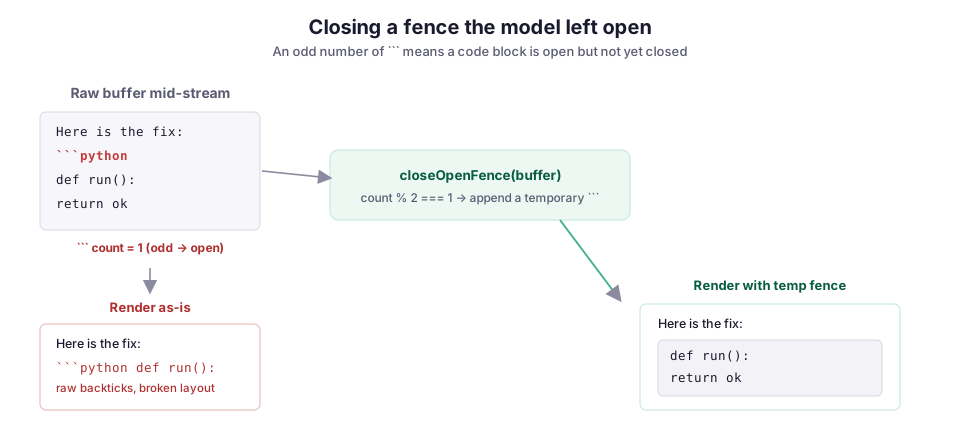
Parsing smarter does not fix the code-fence flash. The problem is not how often you parse; a half-written fence genuinely is not a fence yet. The cleanest fix is to lie to the parser: before rendering, find syntax the model has opened but not closed, and close it temporarily.
An open code fence is the case that matters most, because the miss is so visible: raw source text with backticks instead of a code box. Count the fences, and if the count is odd, append a closing fence for this render only:
function closeOpenFence(markdown) {
  const fenceCount = (markdown.match(/```/g) || []).length;
  // Odd number of ``` means a fence is still open.
  return fenceCount % 2 === 1 ? `${markdown}\n\`\`\`` : markdown;
}
Run the raw buffer through closeOpenFence before you split it into blocks. As soon as the model writes the opening fence, the content renders as a code block and stays a code block as the code fills in, instead of flashing from raw backticks to a box. When the real closing fence arrives, the count is even, so your temporary fence drops out on the next parse. The same trick works for unclosed bold and inline code, but the code fence is the one worth doing first.
If you would rather not maintain this yourself, purpose-built renderers now handle it. Streamdown, a drop-in react-markdown replacement from the Vercel team, renders an open code block as soon as the model starts one and is built for exactly these partial-syntax states. Once your own preprocessing grows past the code fence, switching to it is a reasonable call.
Do not render model output as trusted HTML
By default, react-markdown does not render raw HTML. That is the safe default, and one reason to prefer it over hand-rolling with dangerouslySetInnerHTML. The moment you add rehype-raw to support inline HTML in answers, model output becomes a script-injection path. A retrieved document or a prompt-injected instruction can carry an <img onerror=...> or a javascript: link straight into your DOM. If you allow HTML, sanitize it:
import rehypeSanitize from 'rehype-sanitize';

<ReactMarkdown
  remarkPlugins={[remarkGfm]}
  rehypePlugins={[rehypeSanitize]}
>
  {content}
</ReactMarkdown>;
rehype-sanitize runs inside the same AST, so you are not shipping a second parser. It strips event handlers and dangerous URLs while keeping the formatting. This matters more with RAG (retrieval-augmented generation) in the loop, because the text you are rendering was partly written by documents you crawled, not just by the model.
Failure modes
Auto-scroll fighting the user. Scrolling to the bottom on every update keeps the newest text visible, until the user scrolls up to re-read something and your code yanks them back down on the next token. Check whether they are near the bottom before you scroll, and auto-scroll only if they already were. Missing this small check is one of the most common broken-chat-UI complaints.
Throttling that outlives the stream. The interval in useThrottledStream runs forever unless you clear it. The guard prev === pending.current keeps it from re-rendering on idle ticks, but still stop the timer when the stream ends, so you are not spinning a setInterval for every finished message on screen.
Index keys after the stream. Append-only index keys are fine while streaming. If the same component later supports editing or deleting a block, switch to stable ids first, or React will paste new content into an old block’s DOM node.
Trusting the fence count with inline backticks. Counting ``` is a heuristic, not a parser, and a message that legitimately discusses triple-backticks in prose can throw the count off. It is right the vast majority of the time, and when it is wrong the damage is cosmetic.
Testing only on short answers. Every one of these problems is invisible on a two-line reply and obvious on a two-page one. Test against a long, code-heavy response streamed at real speed, or you will ship the naive version and hear about it from users on the answers that matter most.
Tradeoffs: what to add first
The throttle and the block memoization are close to free, and I would put them in from the first commit: the value is real and the cost is a few lines. The fence-closing preprocessing needs judgment. It is a heuristic that accepts a small chance of a cosmetic miss in exchange for killing the most jarring flicker. That trade is almost always worth it, but it is a trade. Once you find yourself special-casing bold, then inline code, then tables, then math, you have started writing a streaming Markdown renderer. That is the point to adopt one, like Streamdown or the Vercel AI SDK, instead of maintaining your own.
Putting it together
The rendering side of an LLM chat UI looks trivial until the stream is live. Then it becomes a small pile of specific problems: quadratic re-parsing, flicker because a prefix is not a document, an auto-scroll that fights the reader, and model text you should not trust as HTML. None of them needs a framework:
- Throttle the updates, so you parse a few times a second instead of fifty.
- Split the answer into blocks and memoize them, so a new token re-parses only the block being written.
- Close the fences the model has not closed yet.
- Sanitize what you render.
That is the same chat surface behind CloudCanvasAI and the Archi copilot. The whole point there is watching the answer build in real time, so the rendering has to be as clean as the stream feeding it.
Diagrams by M. Hassan Ahmed, released under CC0. Image credit: original work by the author.