FastAPI WebSockets for Streaming LLM Chat
SSE streams one direction only. When an LLM chat needs the browser to interrupt a running response, FastAPI WebSockets give you a full-duplex channel.

Most LLM chat backends start with Server-Sent Events (SSE), and for good reason. You open a text/event-stream response, push tokens as they come off the model, and the browser paints them. I covered that setup in an earlier post on streaming from FastAPI with SSE. For a plain question-and-answer box, it is the right amount of machinery.
The trouble starts when the client needs to say something back while the model is still talking. A user hits stop halfway through a 900-token answer, or starts typing the next message before the current one finishes. SSE is a one-way pipe by design (MDN’s own docs call this out), so the usual workaround is a second HTTP request to a /cancel endpoint that finds the right in-flight generation and tears it down. That works, but now you are correlating two connections and hoping they agree on which request is being cancelled.
A WebSocket collapses that into one connection: tokens go down and control messages come up over the same socket. This post is for engineers who already stream LLM output from FastAPI and have hit the point where one direction isn’t enough. I’ll cover the endpoint itself and how to run the send and receive loops concurrently, so a cancel actually interrupts generation. Then come the operational parts: keeping dead connections from piling up, authenticating the connection, and what breaks once you run more than one worker.
SSE or WebSocket: pick the smaller tool that fits
Before reaching for a WebSocket, be honest about whether you need one. The WebSocket protocol buys you full-duplex framing (both sides can send at any time) over a single TCP connection. You need that only if messages genuinely flow both ways during a single exchange:
- One request in, a stream of tokens out, nothing from the client until it’s done: SSE is simpler, survives proxies better, and reconnects for free with
Last-Event-ID. - The client sends things mid-stream (cancel, edits, tool approvals, live cursors): a WebSocket earns its keep.
An LLM chat with a stop button, live typing indicators, or interactive tool confirmation falls in the second case. That is the scenario this post builds.
The basic endpoint
FastAPI exposes WebSockets through Starlette, the toolkit FastAPI is built on. The handler is an async def that accepts the connection, then reads and writes messages until someone hangs up. This minimal version just acknowledges each message it receives:
from fastapi import FastAPI, WebSocket, WebSocketDisconnect

app = FastAPI()

@app.websocket("/ws/chat")
async def chat(ws: WebSocket):
    await ws.accept()
    try:
        while True:
            msg = await ws.receive_json()
            await ws.send_json({"type": "ack", "id": msg["id"]})
    except WebSocketDisconnect:
        # client closed the tab or lost the network; nothing to clean up here
        pass
receive_json waits until a frame arrives, and WebSocketDisconnect is raised when the peer goes away. That much is standard FastAPI WebSocket usage. The interesting part is what happens when one message kicks off a long-running token stream and you still want to hear the client during it.
Sending and receiving at the same time
Here is the mistake I made the first time. I read a message, ran an async for over the model’s tokens to send each one, then looped back to read the next message. While that async for runs, nothing is calling receive. A cancel frame from the browser just sits in the buffer until generation finishes on its own, which is exactly the moment you no longer care about it.
The fix is to run two coroutines against the same socket. One produces tokens; the other listens for control frames. When a cancel arrives, the listener cancels the producer.
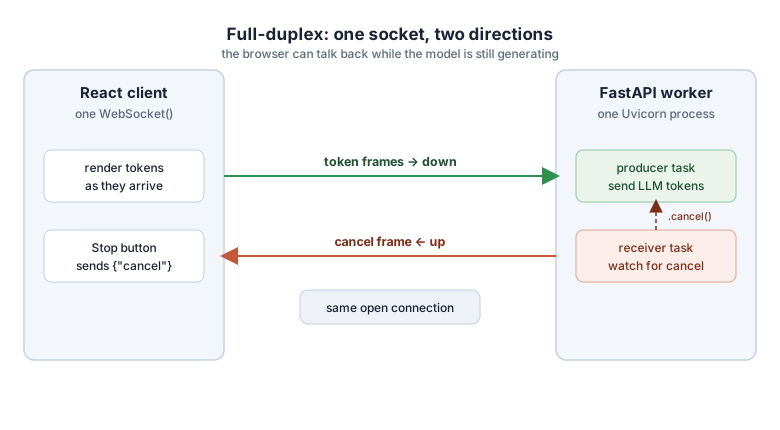
In the code, each incoming chat message starts a producer task and a watcher task, and the handler waits for whichever finishes first:
import asyncio
from fastapi import WebSocket, WebSocketDisconnect

async def chat(ws: WebSocket):
    await ws.accept()
    try:
        while True:
            req = await ws.receive_json()
            if req.get("type") != "message":
                continue

            producer = asyncio.create_task(stream_answer(ws, req))
            watcher = asyncio.create_task(watch_for_cancel(ws, producer))

            # whichever finishes first, tear down the other
            done, pending = await asyncio.wait(
                {producer, watcher},
                return_when=asyncio.FIRST_COMPLETED,
            )
            for task in pending:
                task.cancel()
            await asyncio.gather(*pending, return_exceptions=True)
    except WebSocketDisconnect:
        pass


async def stream_answer(ws: WebSocket, req: dict):
    async for token in llm_stream(req["text"]):   # your model client
        await ws.send_json({"type": "token", "text": token})
    await ws.send_json({"type": "done"})


async def watch_for_cancel(ws: WebSocket, producer: asyncio.Task):
    while True:
        msg = await ws.receive_json()
        if msg.get("type") == "cancel":
            producer.cancel()
            return
Two pieces are load-bearing here:
asyncio.waitwithFIRST_COMPLETED. Both the normal case (the answer finishes) and the interrupt case (a cancel comes in) end the round, and the loser gets cancelled either way.return_exceptions=Trueon thegather. It swallows theCancelledErrorthat the cancelled task raises, so it doesn’t crash the handler.
This is the server-side mirror of what I did on the frontend with an AbortController to cancel a stream. The difference is that the cancel signal now rides the same connection as the tokens instead of firing off a separate request.
One subtlety: cancelling the producer task stops your loop from sending more tokens, but your model client may still hold an open HTTP request to the provider. Make sure the client’s context manager sits inside stream_answer, so the CancelledError propagates into it and closes the request. Otherwise you stop paying attention to the response while still paying for it.
Heartbeats, because TCP won’t tell you a connection is dead
A WebSocket sits on a TCP connection, and TCP will happily believe a connection is alive long after the client’s laptop went into a tunnel. If you never write to a dead socket, you may never learn it’s dead, and the coroutine holding it leaks. On top of that, most reverse proxies close idle connections on a timer: nginx defaults proxy_read_timeout to 60 seconds, and AWS load balancers idle out around the same mark.
The protocol has ping/pong frames for exactly this. Send a ping on an interval, and if no pong comes back within a timeout, treat the connection as gone and close it. A small keepalive task running alongside the others does the job:
async def keepalive(ws: WebSocket, interval: float = 20.0):
    while True:
        await asyncio.sleep(interval)
        # a lightweight app-level ping; the client answers with a pong frame
        await ws.send_json({"type": "ping"})
The point is to keep the interval under the proxy’s idle timeout. Twenty seconds against a 60-second proxy timeout leaves margin.
If you terminate the socket at the proxy and only speak HTTP to the app, confirm the proxy is configured for WebSocket upgrades at all. A proxy that doesn’t pass through the Upgrade/Connection headers is the classic reason a connection works locally and dies behind nginx.
Authenticating the handshake
Browsers won’t let you set arbitrary headers on a WebSocket, so the Authorization: Bearer ... pattern you use for REST doesn’t carry over. You have two realistic options:
- Pass a short-lived token as a query parameter.
- Use the
Sec-WebSocket-Protocolsubprotocol header, which the browser does let you set.
Either way, validate before you call accept(), and close with a policy-violation code if validation fails. This version reads the token from the query string:
from fastapi import WebSocket, status

@app.websocket("/ws/chat")
async def chat(ws: WebSocket):
    token = ws.query_params.get("token")
    user = await verify_token(token)         # your own check
    if user is None:
        await ws.close(code=status.WS_1008_POLICY_VIOLATION)
        return
    await ws.accept()
    ...
Prefer a short-lived token minted for this purpose over your main session token. Query strings land in access logs and proxy logs, so a token that expires in a minute is a smaller thing to leak than one good for a week.
What breaks when you add a second worker
This is the part that surprises people. Everything above works on one Uvicorn worker. The moment you scale to several workers, or several pods, the design falls apart, because a WebSocket’s state lives in the process that accepted it. Two consequences follow:
- Routing. If you load-balance without sticky routing, a client’s frames can land on a worker that never saw its connection. You need the balancer to pin a connection to a backend, or you accept that any given socket is owned by exactly one process and route accordingly.
- Reaching other users. If one user’s action needs to reach another user (a shared room, a broadcast, a “someone else is typing” signal), the worker holding your socket has no way to reach the worker holding theirs. The in-memory
set()of connections that every tutorial shows only sees the sockets on the local process.
The standard fix is a message broker that every worker subscribes to. Redis pub/sub is the common choice: a worker publishes an event, every worker receives it on its subscription, and each one forwards it to the local sockets that care. The Redis pub/sub docs cover the primitive. In FastAPI, the shape is a background subscriber task per process that fans messages out to that process’s own connections.
For plain one-user token streaming, you may never need this. For anything multi-user, design for it up front, because retrofitting a broadcast layer after you have assumed a single process is a rewrite.
Backpressure and slow clients
When send_json returns, the frame is only queued; the client hasn’t necessarily received it. If the model generates faster than a phone on hotel wifi can drain the socket, that queue grows in your process memory. This is backpressure: the consumer can’t keep up, so something on the sending side has to give.
For token-by-token text this is rarely fatal. If you stream large chunks, cap it. Keep a bounded buffer, and if it fills, either coalesce tokens into bigger, less frequent frames, or drop the connection rather than let one slow client bloat a worker. If you run this in production, send-queue depth is worth a metric.
Tradeoffs, and what I’d reach for first
I don’t default to WebSockets. For the common case (one prompt, one streamed answer, nothing from the client until it finishes), SSE is less to get wrong. It also degrades more gracefully through corporate proxies that mangle upgrades, and the reconnect-with-Last-Event-ID story alone saves real code.
WebSockets win when the interaction is genuinely two-way during a single turn: a stop button that must land immediately, tool-use confirmations the user approves inline, collaborative sessions, or a UI that streams state in both directions. The cost is everything above: heartbeats you have to run yourself, auth that can’t use headers, and a broker the day you outgrow one process. Pay it when the interaction demands it, not before.
I lean on this pattern in the interactive AI work on my portfolio. In the split-panel chat in CloudCanvasAI, a document renders as the model writes it. In the operator copilot in Archi, a running answer sometimes needs to be cut short. In both, the deciding factor was the same: the client had something to say before the server was done talking, and a single full-duplex connection was the honest way to carry it.
Further reading: the FastAPI WebSockets guide, Starlette’s WebSocket API, and RFC 6455 for the protocol itself.