Streaming LLM Responses from FastAPI with SSE
Stream LLM output token by token from a FastAPI backend with Server-Sent Events: working code, the EventSource client, proxy buffering, and failure modes.

A language model takes a few seconds to write a paragraph. If your API waits for the full completion and returns it in one shot, the user stares at a spinner the whole time, and then the answer appears all at once. The model was producing words the entire time; you just hid them. Streaming gives that time back: the first token shows up in a few hundred milliseconds, and the rest fill in as the model writes.
This post is for engineers who have a FastAPI backend in front of an LLM, plus a JavaScript frontend, and want the response to land word by word. It covers the server endpoint, the adapter that pulls text out of the model, the browser client, and the problems that appear after the demo works: proxy buffering, idle timeouts, errors mid-stream, and the limits of EventSource.
The transport is Server-Sent Events (SSE). I reached for it when I built the streaming chat panel in CloudCanvasAI, where you talk to Claude on the left and a document renders live on the right. The same shape works for any provider; Gemini Alchemy is another FastAPI backend of mine that streams the same way.
Why SSE instead of WebSockets
LLM streaming is one-directional. The client sends one prompt, and the server pushes a long sequence of tokens back. Nothing flows the other way until the next turn. That is exactly the shape Server-Sent Events was designed for: a one-way channel from server to browser over a single long-lived HTTP response.
WebSockets give you a full-duplex socket, where both sides can send at any time. That is more than this job needs, and it costs more to operate. A WebSocket leaves HTTP behind, so your auth middleware, logging, and load balancer rules all need a second path. SSE is plain HTTP with a particular content type, so everything that already understands a request keeps working. The browser side is a few lines, and reconnection is built into the EventSource interface instead of being something you write yourself.
The diagram below shows the whole system. A request goes out, and tokens come back on the same connection until the server signals that it is done.
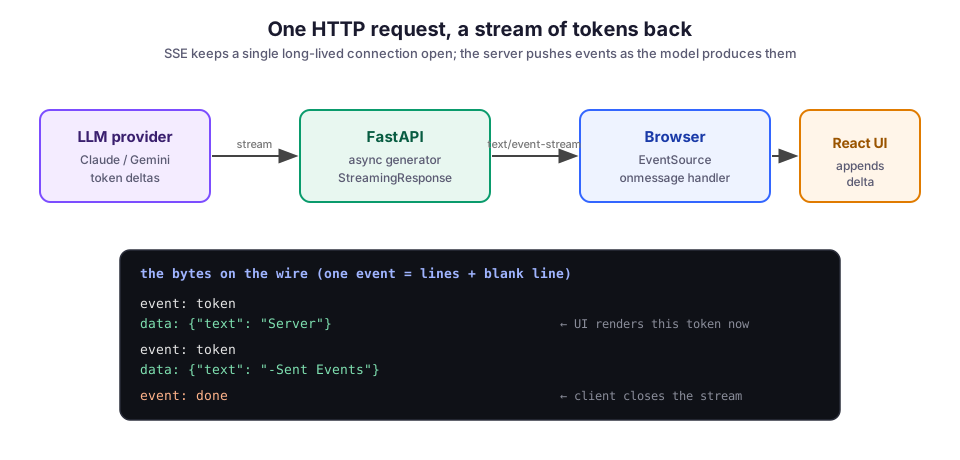
The bottom half of the diagram is the part people skip and then end up debugging. SSE is a concrete wire format. Each event is one or more lines of text, and a blank line ends it. Get the blank line wrong and the browser buffers your whole stream, waiting for an event that never closes.
The server: an async generator behind StreamingResponse
FastAPI can stream whatever an async generator yields. (An async generator is an async def function that uses yield to produce values one at a time.) Wrap the generator in a StreamingResponse with the text/event-stream media type, and you have a working SSE endpoint. The handler below uses a small sse helper to format each message, sends model output as token events, and ends with a done event.
import json
from fastapi import FastAPI
from fastapi.responses import StreamingResponse

app = FastAPI()

def sse(event: str, data: dict) -> str:
    """Format one SSE message. The trailing blank line ends the event."""
    return f"event: {event}\ndata: {json.dumps(data)}\n\n"

async def token_stream(prompt: str):
    async for delta in call_model(prompt):   # your provider's streaming call
        yield sse("token", {"text": delta})
    yield sse("done", {})

@app.get("/chat")
async def chat(prompt: str):
    return StreamingResponse(
        token_stream(prompt),
        media_type="text/event-stream",
        headers={
            "Cache-Control": "no-cache",
            "X-Accel-Buffering": "no",   # tell nginx not to buffer
        },
    )
Two details in that handler do real work:
- The
\n\nat the end of every message is the event boundary. Without it, the client never sees a complete event. - The
X-Accel-Buffering: noheader is meant for the reverse proxy. Leaving it out causes the single most common “streaming doesn’t stream” bug, which the proxy section below explains.
If you would rather not format the wire bytes by hand, sse-starlette provides an EventSourceResponse that takes the same async generator. It handles the framing and sends periodic pings. On a small service, the manual version above is fine and keeps the dependency list short.
Getting text deltas out of the model
Every major SDK exposes its streaming output as an async iterator of deltas, meaning the small chunks of new text the model produced since the previous chunk. With Anthropic’s SDK, the streaming API looks like this:
from anthropic import AsyncAnthropic

client = AsyncAnthropic()

async def call_model(prompt: str):
    async with client.messages.stream(
        model="claude-sonnet-4-6",
        max_tokens=1024,
        messages=[{"role": "user", "content": prompt}],
    ) as stream:
        async for text in stream.text_stream:
            yield text
call_model opens the stream and passes each piece of text from text_stream straight through. Other providers follow the same pattern; only the method names change.
Keep this adapter separate from the SSE formatting. The endpoint should not care which model is behind it, and you will want to swap models without touching the transport. That separation is what let CloudCanvasAI route different document tasks through different skills while the streaming endpoint stayed the same.
The browser client: EventSource
In the browser, the consumer is small. Open an EventSource, listen for your named events (token and done), and append each token as it arrives.
const source = new EventSource(`/chat?prompt=${encodeURIComponent(prompt)}`);

source.addEventListener("token", (e) => {
  const { text } = JSON.parse(e.data);
  appendToMessage(text);          // your state update
});

source.addEventListener("done", () => {
  source.close();                 // stop, or the browser will reconnect
});

source.onerror = () => {
  source.close();                 // handle the failure, then decide to retry
};
Always call close() on done. If you do not, EventSource treats the closed connection as a dropped one and reconnects automatically, which sends your whole request again. Auto-reconnect is useful for genuine network blips. It is annoying when it re-runs a paid completion because you forgot to close a finished stream.
Why streaming breaks behind nginx: proxy buffering
You write all of the above, it streams perfectly against localhost, you deploy it behind nginx, and the tokens arrive in one lump at the end. Nothing in your code changed. The reverse proxy (the server in front of your app that forwards requests to it) is buffering the response. It collects the whole body before passing it on, which defeats the point.
The fix has two sides:
- In the app: the
X-Accel-Buffering: noresponse header from the handler tells nginx to pass this one response straight through. - In nginx: the streaming location also needs
proxy_buffering off;.
Both settings exist because buffering is the right default for normal responses and the wrong one for a stream, so you have to opt out explicitly. The behavior is documented in the nginx proxy module. Check it first whenever streaming works locally but not in production.
Heartbeats for quiet connections
A stream that goes quiet is ambiguous. The model might be thinking, or the connection might be dead, and the client cannot tell which. Proxies and load balancers also close idle connections after a timeout. A heartbeat handles both problems. Every fifteen seconds or so, send an SSE comment line: a line that begins with a colon, which the client ignores. The generator below sends one as soon as the stream opens, before the first token:
async def token_stream(prompt: str):
    yield ": keep-alive\n\n"          # comment line, ignored by EventSource
    async for delta in call_model(prompt):
        yield sse("token", {"text": delta})
    yield sse("done", {})
Once tokens are flowing, the data itself keeps the connection warm, so the heartbeat mostly matters in the gap before the first token, while the model is still reading a long prompt. If you use sse-starlette, its ping mechanism does this for you.
Handling errors in the middle of a stream
Once you have sent a 200 OK and started streaming, you cannot take it back. If the model call throws on token five hundred, the HTTP status went out long ago. The honest option is to send the error as its own event and let the client react. The generator below catches the failure, emits an error event, and always finishes with done:
async def token_stream(prompt: str):
    try:
        async for delta in call_model(prompt):
            yield sse("token", {"text": delta})
    except Exception as exc:
        yield sse("error", {"message": "generation failed"})
        log.exception("stream failed: %s", exc)
    finally:
        yield sse("done", {})
The client listens for error the same way it listens for token. It then marks the partial message as failed, instead of leaving a half-written reply hanging. Log the real exception on the server, and send the user a generic message so a stack trace never goes out on the wire.
EventSource only does GET
The real limitation of EventSource is that it issues a GET and cannot set a request body or custom headers. For a short prompt, a query string is fine. For a long chat history, GET stops being workable. A bearer token does not belong in the URL either, because a token in a query string ends up in access logs.
There are two ways out:
- Keep the payload on the server. Pass an opaque session id in the URL and keep the real payload server-side.
- Replace
EventSourcewithfetch. Read the sametext/event-streamresponse withfetchand aReadableStream. This lets you POST a JSON body and set headers, while you parse the exact same event format yourself.
I used the second option in CloudCanvasAI, because each turn carries context and auth that have no business sitting in a URL. You give up the built-in reconnect and parse the stream by hand. For an authenticated chat endpoint, that is the right trade.
Tradeoffs: what SSE can’t do, and what it costs to run
SSE is the smaller, calmer choice for this job, and the price is its narrowness. By design, it carries text in one direction. Streaming raw binary means base64 encoding, which bloats the payload. Anything genuinely bidirectional and low-latency, like a voice loop, is a WebSocket job. SSE earns its place when the interaction is request in, long text out, which covers most LLM chat and most agent output.
The operational cost is that you now hold a connection open for the length of a generation. Long-lived requests change how you think about worker counts, timeouts, and graceful shutdown. Run an async server such as uvicorn so a streaming request does not pin a whole worker. And make sure your deploy drains in-flight streams instead of cutting them off mid-token.
What I would do differently
Early on, I let token formatting and model calls bleed into the same function, so swapping a model meant editing the streaming path. Splitting the provider adapter from the SSE layer, as the code above does, is worth doing from the first commit.
I would also send a stable message id in the first event from the start. When a stream drops and the user retries, that id lets you reconcile the partial message instead of leaving a duplicate. It is far cheaper to add on day one than to backfill once the UI already assumes there is no id.
If you want to see this pattern inside a full product, CloudCanvasAI pairs a streaming FastAPI backend with a live document preview. Gemini Alchemy streams structured output from a FastAPI service into an interactive UI. In both, the transport is the handful of lines above.
Image credit: SSE streaming diagrams by M. Hassan Ahmed, created for this post, released under CC0 (public domain).