Kubernetes Jobs and CronJobs for Batch Work
Run finite and scheduled work on Kubernetes with Jobs and CronJobs: completions, parallelism, backoffLimit, cleanup, and the failure modes that bite.

Most of what you deploy to Kubernetes is meant to run forever. A Deployment keeps a web server alive: if a pod dies, the Deployment replaces it, indefinitely, because a server is never supposed to be “done”. Then you need to run a database migration, reprocess yesterday’s dataset, or generate a nightly report, and the model flips. Now the point of the work is to finish, and “keep restarting forever” is exactly the wrong behavior.
That is what Jobs and CronJobs are for. A Job runs one or more pods until a set number of them exit successfully, then stops. A CronJob creates Jobs on a schedule. The API looks small, and your first Job will work on the first try. The problems show up later:
- a Job that retries a failure that can never succeed, a dozen times;
- finished pods piling up until you cannot list them;
- a CronJob quietly stacking overlapping runs because the previous one ran long.
This post is for engineers who are comfortable with Deployments and now have finite or scheduled work to run. I maintained the workflow tooling for CMS production at CERN (WMCore + Unified), where batch is the whole job rather than a side task. Most of what follows is something I have either relied on or been burned by. I cover the completion model, retries and deadlines, cleanup, and then CronJobs and the ways both fail.
How a Job differs from a Deployment
The first thing that trips people up is restartPolicy. A Deployment’s pods use Always, because a server that exits should come back. A Job’s pods cannot use Always at all; the only legal values are OnFailure and Never. That one field captures the whole idea. A Job pod that exits with code 0 is done, and the controller must not treat a clean exit as something to recover from.
Here is a minimal Job. It runs one reprocessing script, allows four retries, and sets memory requests and limits:
apiVersion: batch/v1
kind: Job
metadata:
  name: dataset-reprocess
spec:
  backoffLimit: 4
  template:
    spec:
      restartPolicy: Never
      containers:
        - name: reprocess
          image: registry.example/reprocess:2.1
          command: ['python', 'reprocess.py', '--date', '2026-08-07']
          resources:
            requests: { cpu: '1', memory: '2Gi' }
            limits: { memory: '2Gi' }
The pod runs reprocess.py. If it exits 0, the Job is complete. If it exits non-zero, that counts as a failure. What happens next depends on two fields most people copy without reading, restartPolicy and backoffLimit, which I cover below.
Note the memory requests and limits. Batch pods get OOMKilled the same way service pods do. A Job that dies 90% of the way through a four-hour run because you set memory too low is a special kind of painful.
Completions and parallelism: three shapes of batch work
A Job is not always one pod. Two fields, completions and parallelism, turn the same object into three different shapes of work. Knowing which shape you want is most of using Jobs well.
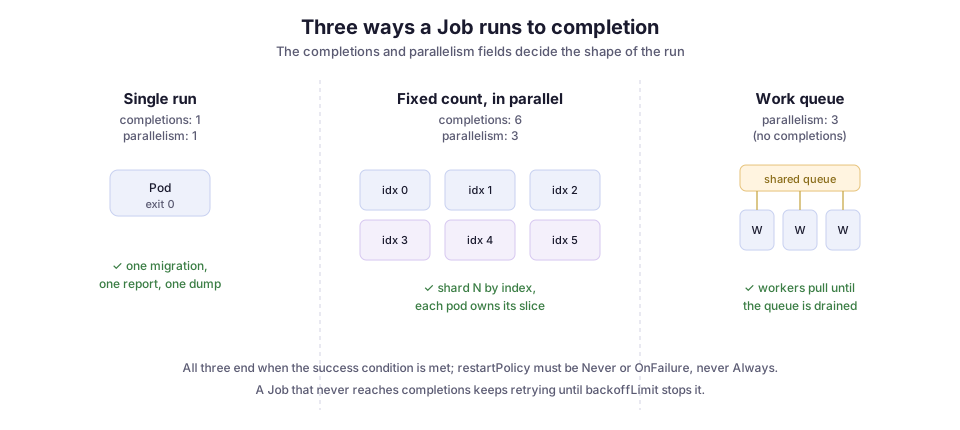
- One and done. Leave both fields at their default of 1. One pod runs once. This is the migration, report, or dump case, and it covers most Jobs.
- Fixed count, run in parallel. Set
completions: 6, parallelism: 3, and the controller keeps three pods running until six have succeeded. This is how you shard a fixed amount of work: split your input into six slices and process them three at a time. WithcompletionMode: Indexed(stable since Kubernetes 1.24), each pod gets aJOB_COMPLETION_INDEXfrom 0 to 5 in its environment. Pod 3 can then deterministically pick slice 3, with no coordination between pods. - Work queue. Set
parallelismbut leavecompletionsunset, and point every pod at a shared queue (Redis, a message broker, a database table). Each worker pulls items until the queue is empty, then exits. The Job finishes when all the pods have exited successfully. Use this pattern when you do not know the item count up front, or when items are cheap enough that static sharding would leave some pods idle while others grind.
I use the indexed pattern most. “Here are N things, process them” describes most batch work, and the index removes the coordination problem entirely. There is no leader, no locking, and no double-processing: the pod’s index is its assignment.
When a Job fails: backoff, deadlines, and which failures to retry
A batch pod can fail for two very different reasons: a transient problem that a retry would fix, or a permanent one that no retry will. Kubernetes historically handled both with one blunt instrument, backoffLimit. It is the number of retries before the Job gives up and is marked Failed. It defaults to 6. Failed pods are recreated with an exponential back-off that starts at 10 seconds and caps at 6 minutes.
The trap is that backoffLimit cannot tell a flaky failure from a doomed one. A network blip during a download is worth retrying. A SIGKILL from the OOM killer, or an exit code that means “your input file is malformed”, will fail the same way on all six retries. You just wait through six growing back-offs to reach the failure you already had after the first pod.
Pod failure policy (podFailurePolicy, stable since Kubernetes 1.31) fixes this. It lets you branch on the actual exit code, or on the reason a pod was killed. This example has two rules:
spec:
  backoffLimit: 4
  podFailurePolicy:
    rules:
      # A specific "bad input" exit code is not worth retrying, so fail fast.
      - action: FailJob
        onExitCodes: { operator: In, values: [42] }
      # Pods evicted by the node (preemption, drain) shouldn't burn a retry.
      - action: Ignore
        onPodConditions:
          - type: DisruptionTarget
Each rule saves something real:
FailJobon exit code 42. Your reprocess script cansys.exit(42)on a corrupt input, and the Job fails immediately instead of retrying a file that will never parse.IgnoreonDisruptionTarget. A pod the cluster killed for its own reasons (a node drain, a spot-instance reclaim) does not count against your four real retries. A maintenance window no longer uses up the budget you meant for genuine application errors.
The other guardrail limits time rather than attempts. activeDeadlineSeconds caps the wall-clock lifetime of the whole Job. Once it passes, the Job is terminated and marked Failed, however many retries are left. Set it on anything that talks to a flaky dependency. Otherwise “retry with back-off” and “hang forever on a socket” can combine into a Job that never ends and never fails.
Cleaning up finished Jobs
This one surprises people: a Job that succeeds does not delete itself. The Job object and its completed pods stay around so you can read logs and status. Run a Job every few minutes from a CronJob and you accumulate thousands of Completed pods. kubectl get pods becomes a wall of noise, and eventually etcd and the API server feel the load.
The fix is ttlSecondsAfterFinished (stable since Kubernetes 1.23). When it is set, a controller deletes the Job that many seconds after it finishes, whether it succeeded or failed. The Job’s pods go with it, because the Job owns them:
spec:
  ttlSecondsAfterFinished: 3600 # clean up an hour after finishing
  backoffLimit: 4
  template:
    # ...
An hour is a reasonable default. It is long enough to grab logs after something breaks, and short enough that nothing piles up.
If you need the logs to outlive the pod (and for anything scheduled, you do), ship them somewhere first. This is where the structured-logging-to-OpenSearch setup earns its place. Once each run’s logs land in an index, deleting the finished pod costs you nothing, because the record already lives somewhere you can query.
CronJobs: Jobs on a schedule
A CronJob is a thin wrapper that creates a Job on a cron schedule. The spec has what you would expect, plus a few fields that matter more than they look. This one runs a report every night at 02:00 Zurich time, never overlaps runs, and limits how much history it keeps:
apiVersion: batch/v1
kind: CronJob
metadata:
  name: nightly-report
spec:
  schedule: '0 2 * * *' # 02:00 every day
  timeZone: 'Europe/Zurich' # stable since 1.27; without it, runs in the controller's zone
  concurrencyPolicy: Forbid
  startingDeadlineSeconds: 300
  successfulJobsHistoryLimit: 3
  failedJobsHistoryLimit: 1
  jobTemplate:
    spec:
      backoffLimit: 2
      ttlSecondsAfterFinished: 86400
      template:
        spec:
          restartPolicy: Never
          containers:
            - name: report
              image: registry.example/report:1.4
              command: ['python', 'report.py']
The schedule is standard cron syntax. Set timeZone explicitly (supported since Kubernetes 1.27). If you leave it out, the schedule runs in whatever zone the controller manager thinks it is in. That is a great way to have a “2 AM” report fire at 2 AM UTC and confuse everyone working CERN hours.
The history limits keep the last few Jobs around for inspection and garbage-collect the rest. So a CronJob cleans up after itself even without a per-Job TTL.
concurrencyPolicy: what happens when a run overruns
The field that actually decides behavior under load is concurrencyPolicy. It controls what the CronJob does when a new run is due but the previous one has not finished.
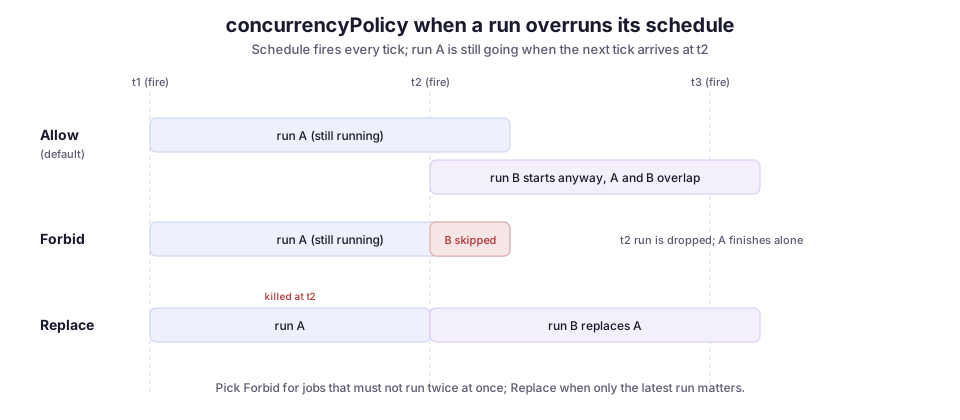
There are three options:
Allow(the default) starts a new run even if the previous one is still going. That is fine for short, independent jobs. It is a real problem for anything that takes a lock, writes to the same output, or does heavy I/O: two overlapping nightly reports can double the load or corrupt a shared file.Forbidskips the new run if the previous one has not finished. Use it when a job must never run twice at once.Replacekills the running one and starts fresh. Use it when only the newest run matters and a stale run in flight is just waste.
startingDeadlineSeconds: how late a run may start
startingDeadlineSeconds is the other field worth setting. Sometimes the controller cannot start a scheduled run on time, because it was down or the cluster was busy. This field sets how long after the scheduled time the controller may still start the run late. Leave it unset, and a controller that misses too many scheduled times gives up in a way that surprises people. The next section explains how.
Where it breaks
The happy path is a page of YAML. The interesting engineering is in the failures.
Not shipping logs before the TTL deletes them. This is the most common own goal with scheduled Jobs. You set ttlSecondsAfterFinished, a run fails at 3 AM, and by the time you look, the pod is gone and so are its logs. TTL and log retention are the same decision. Send logs to a store on the way out, then let the pod be deleted.
concurrencyPolicy: Allow plus a job that runs long. The default lets runs pile up. If run N regularly overruns into run N+1’s slot, you get overlap you never designed for. If the runs share a lock or an output path, that overlap is a correctness bug, not just extra load. Choose the policy on purpose.
The missed-schedule cliff. The CronJob controller counts how many scheduled times it missed since it last saw the object. If that count passes 100, it stops scheduling and logs Cannot determine if job needs to be started ... too many missed start times. That can happen if, say, the controller was down for a couple of hours on a */1 * * * * schedule. Setting startingDeadlineSeconds bounds how far back the controller looks, so a short outage does not break a frequent schedule. The CronJob docs call this out directly, and it has surprised more than one on-call engineer.
Assuming exactly-once. A CronJob gives you at-least-once semantics, not exactly-once. Under certain conditions it can create two Jobs for one scheduled time, or none. Your job body must be idempotent (safe to run twice for the same slot), or you need your own guard, such as a row lock or an “already processed 2026-08-07” marker. Do not build a design that assumes each scheduled run happens once and only once.
Retrying failures that cannot succeed. I covered this above, but it is the most common waste. Without a podFailurePolicy, backoffLimit patiently retries a corrupt-input or OOM failure through every growing back-off before giving up. Branch on the exit code, and fail fast on failures that trying again cannot fix.
Tradeoffs, and when to reach for something bigger
Jobs and CronJobs are deliberately simple, and that makes them the right tool for a large slice of batch work: run this once, run this on a schedule, shard this fixed set of items. When the work is a single step or an embarrassingly parallel fan-out (independent pieces with no coordination), they are all you need. Anything heavier is over-engineering.
They stop fitting when the work becomes a graph. A Job has no concept of “run B after A succeeds, then C and D in parallel, then E.” You can fake a small DAG (directed acyclic graph of steps) by chaining Jobs from outside the cluster. But once dependencies, fan-out/fan-in, per-step retries, and passing artifacts between steps enter the picture, you want a real workflow engine. Argo Workflows is the common Kubernetes-native choice; it runs each step as a pod and owns the ordering. It is the same lesson as ordering deploys with ArgoCD sync waves: the primitive handles one step well, and ordering many steps is a separate problem that deserves a tool built for it.
In the CMS workflow tooling I worked on, the multi-stage physics pipelines run on WMCore and the grid, a purpose-built workflow system that predates all of this. But the operational glue around it is squarely Job and CronJob territory: nightly reconciliation, one-off reprocessing, scheduled health checks, and report generation. For that glue, getting the boring fields right separates batch that runs quietly from batch you babysit:
- a sane
backoffLimit; - a
podFailurePolicythat fails fast on bad input; ttlSecondsAfterFinishedpaired with shipped logs;concurrencyPolicy: Forbidon anything that takes a lock.
The API is small. The defaults are where the surprises live.
Diagrams by M. Hassan Ahmed, released under CC0. No external image was used for this post; the figures are original work by the author.