How an LLM Agent Tool-Calling Loop Works
A practical look at the agent loop behind LLM tools: how the model asks to call a tool, your code runs it, and the result feeds back until the answer is done.

The first time you wire a tool into a language model, the model seems to do something it cannot do. You ask a question, and partway through answering, the model “runs a search” or “queries a database” and comes back with a fact it had no way of knowing. It looks as if the model reached out and grabbed the data itself.
It did not. A loop sits between you and the model, and that loop is the entire trick. Once you have written it, the mystery is gone. What is left is a control-flow pattern that you fully control.
This post is for engineers who have made a single LLM call and now want the model to use tools: search a corpus, hit an API, run a query, then keep going. I build the loop from scratch in Python with Claude, because the raw version makes every agent framework you meet afterward easy to read. The same loop runs under Archi, the retrieval copilot I worked on for CMS computing operations at CERN. There, “search the logbook” is a tool the model calls when it decides a question needs history it does not already have.
A tool is a description, not a function
The first misconception is that the model executes code. It cannot. The model only ever produces text and structured requests. So what you hand it is not a function but a description of one: a name, a sentence about when to use it, and a JSON Schema that describes the arguments. The list below defines a single tool, search_logbook, that takes one required string argument:
tools = [
    {
        "name": "search_logbook",
        "description": (
            "Search the operations logbook for past entries. Use this when the "
            "user asks about a previous incident, an error message, or how "
            "something was handled before."
        ),
        "input_schema": {
            "type": "object",
            "properties": {
                "query": {"type": "string", "description": "Free-text search query"},
            },
            "required": ["query"],
        },
    }
]
The model reads that list the same way it reads the conversation. When it decides search_logbook fits, it still does not call anything. It emits a structured block that says “I want to call search_logbook with {"query": "T1_US_FNAL transfer error"},” and then it stops and waits. Running the search is your job. The model has handed control back to you mid-thought.
That handoff is the whole mechanism, and one field in the response records it: stop_reason. When the model wants a tool, stop_reason is tool_use. When it has finished and written its answer, stop_reason is end_turn. The whole loop is built around that one field.
The loop, in full
Here is the complete agent. There is less to it than the word “agent” suggests. It calls the model, checks stop_reason, runs any requested tools, appends the results to the conversation, and repeats:
import anthropic

client = anthropic.Anthropic()

def run_tool(name, tool_input):
    if name == "search_logbook":
        return search_logbook(tool_input["query"])   # your real implementation
    return f"Unknown tool: {name}"

messages = [
    {"role": "user", "content": "Has the T1_US_FNAL transfer error happened before?"}
]

while True:
    response = client.messages.create(
        model="claude-sonnet-4-6",
        max_tokens=1024,
        tools=tools,
        messages=messages,
    )

    # The model wrote its final answer. Stop.
    if response.stop_reason != "tool_use":
        break

    # Record what the model said, tool requests and all.
    messages.append({"role": "assistant", "content": response.content})

    # Run every tool the model asked for, collect the results.
    tool_results = []
    for block in response.content:
        if block.type == "tool_use":
            result = run_tool(block.name, block.input)
            tool_results.append({
                "type": "tool_result",
                "tool_use_id": block.id,
                "content": result,
            })

    # Feed the results back as the next user turn, and loop.
    messages.append({"role": "user", "content": tool_results})

answer = "".join(b.text for b in response.content if b.type == "text")
print(answer)
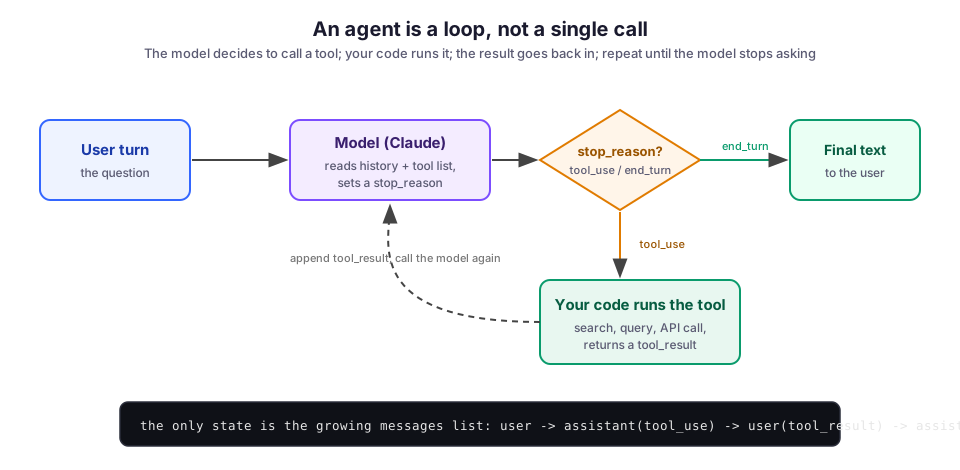
Notice what is not there: no memory, no state machine, no planner. The only thing that persists across iterations is messages. That list grows by two entries per tool call:
- the assistant turn that requested the tool, and
- the user turn that carries the result.
The model rereads the whole list on every pass. That is how it “remembers” what it already searched for.
The diagram below draws out the same loop’s control flow.
Two rules you cannot skip
Two rules in that code are mandatory. Get either one wrong and you get a confusing error instead of a clean one.
- Append the model’s entire
response.contentback intomessages, not just the text. Eachtool_useblock carries anid. The API rejects the next turn if it cannot match everytool_resultto thetool_usethat asked for it. - Set each result’s
tool_use_idto that exact id.
Together, these two rules let the model line up “I asked to search for X” with “here is what the search found.”
The model can ask for several tools at once
A single assistant turn can contain more than one tool_use block. The model might decide it needs to search two logbooks, or read three files, before it can answer. The loop above already handles this. It iterates over every block in response.content and gathers all the results before sending them back.
The detail that bites people is the return shape. All of those results go back in one user message, as a list of tool_result blocks. If you split them across several messages, you quietly teach the model to stop making parallel calls, because the conversation no longer looks the way it did when the calls succeeded. The Anthropic tool-use docs are explicit about this, so follow it from the first version.
Where the loop breaks
The happy path is short. Real systems spend their time in the failures, and most of those are not exotic.
A tool that throws. Your search hits a timeout or a bad query. Do not let that exception escape the loop and kill the turn. Catch it and report it back to the model as a result with is_error set, so the model can recover instead of the whole request dying. The try/except below wraps the tool call from the main loop:
try:
    result = run_tool(block.name, block.input)
    tool_results.append({
        "type": "tool_result",
        "tool_use_id": block.id,
        "content": result,
    })
except Exception as exc:
    tool_results.append({
        "type": "tool_result",
        "tool_use_id": block.id,
        "content": f"Tool failed: {exc}",
        "is_error": True,
    })
Given an error this way, the model usually reads it, adjusts the query, and tries again, or tells the user it could not find the answer. Given an uncaught exception, your process just crashes.
A loop that never ends. Nothing in while True guarantees the model ever returns end_turn. A poorly described tool, or a task the model cannot actually complete, can keep it calling tools in circles. Always cap the iterations. A counter that breaks after, say, eight passes turns an expensive runaway into a bounded, debuggable one.
Context that only grows. Every tool result is appended and never removed, so a long agent run sends more and more tokens through the model on each pass. For a handful of calls this is fine. For a long-running session you eventually need to trim or summarize old tool results, because you pay to resend the entire history on every iteration.
A tool the model ignores, or overuses. The model decides whether to call a tool entirely from its description. A vague description means the tool fires at the wrong times or never fires at all. The fix is almost always in the prose, not the code: say plainly when to use the tool, not just what it does. Anthropic’s recent guidance is that a description stating the trigger condition (“call this when the user asks about a past incident”) gives a real lift over one that only names the capability.
Tool runner versus the manual loop
Every major SDK now ships a helper that hides this loop. Anthropic’s Python SDK has a tool runner that calls your functions and feeds the results back until the model is done. You write the tool bodies and skip the plumbing. Once the pattern is familiar, the runner is the right default.
The manual loop earns its place when you need a seat in the middle of it, for example:
- a human approval step before a tool with side effects runs;
- custom logging on every call;
- a tool you only allow under certain conditions;
- a hard budget on cost.
In Archi, retrieval is read-only and safe to run automatically. Anything that could change state, though, is exactly the kind of action you want to gate, and gating is much easier when you own the loop. My advice: start manual to learn it, switch to the runner when the loop becomes boilerplate, and drop back to manual the moment you need to step in between the model’s request and the tool’s execution.
The limits of a simple loop
The loop is simple, and that simplicity is also its ceiling. It is reactive: the model takes one step, sees the result, and decides the next step. That works well for retrieval and lookups, which is most of what a tool-using assistant does. It is also the shape behind the ReAct pattern (interleaved reasoning and acting), which a lot of agent work descends from.
It fits less well when a task genuinely needs a plan laid out before any action, or when many independent subtasks should run at once. For those cases you build structure on top of this loop; you do not replace it. Anthropic’s Building Effective Agents is a good map of when to add that structure and when a single loop is enough. The honest answer is that a plain loop covers more ground than its simplicity suggests.
What I would do differently
Early on, I underrated tool descriptions. I treated them as documentation and spent my time on the code. In fact they are part of the prompt and deserve the same iteration. A model that calls the wrong tool, or refuses to call any, is usually telling you the description is unclear, not that the model is broken. Now I write the description first, test which queries trigger the tool, and tune the wording before I touch the implementation.
I would also add the iteration cap and the per-tool error handling on day one, not after the first runaway. Both are a few lines. Together they separate an agent that fails loudly and recoverably from one that crashes or quietly burns tokens in a circle.
If you want to see this loop inside real products:
- Archi wraps it around CERN operations data.
- CloudCanvasAI uses tool calls to drive live document edits next to a chat panel.
- LLM DevMate is the smaller, editor-side cousin of the same idea.
The surfaces differ, but the same handful of lines decides when to call out and when to answer.
Image credit: agent-loop diagrams by M. Hassan Ahmed, created for this post, released under CC0 (public domain).