Running LLM-Generated Code in a Sandbox
An LLM that writes and runs code needs real isolation, not a try/except. How to sandbox AI-generated code with E2B microVMs, and the failure modes.

There is a moment in building any code-writing agent when the model hands you a string of Python, and the question stops being “is this a good answer?” and becomes “where do I run this?” In CloudCanvasAI that moment happens constantly. A user asks for a quarterly report, and Claude decides the cleanest way to produce a .docx is to write a short script against python-docx. Now there is a block of code that has to actually execute for the user to get a file back. The model wrote it, nobody reviewed it, and the next request comes from a different user on the same server.
This post is for engineers who have an agent loop working and have reached the execution step. Running the code is easy. The part that needs design is running code you did not write, on behalf of users who do not trust each other, without one session’s mistake becoming everyone’s outage. I walk through why the obvious approaches fail, what each isolation option actually buys you, and how the per-user sandbox in CloudCanvasAI is put together with E2B.
The model writes code; your server runs it
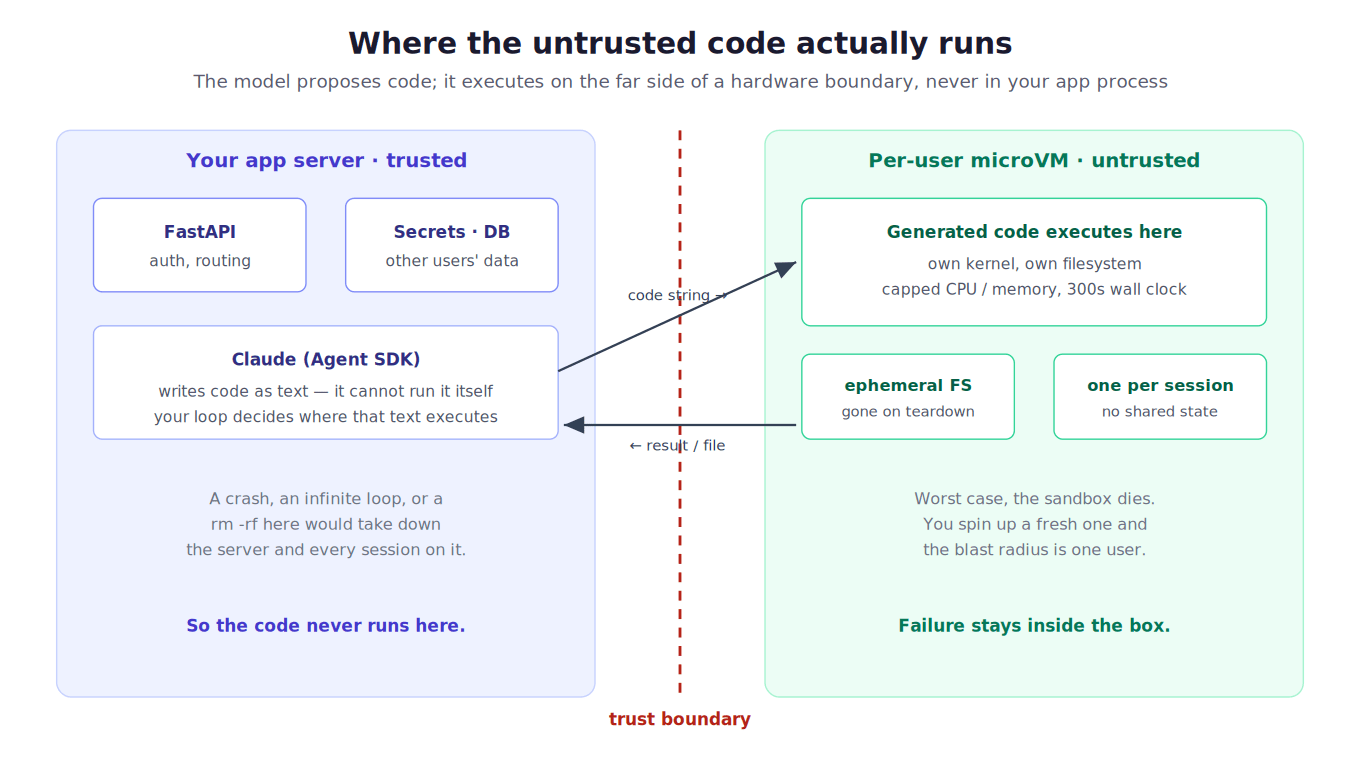
Start by being precise about the mechanics, because they decide where the risk sits. A language model produces text. When it “runs code,” what actually happens is that your loop parses a tool call, pulls out the code string, and your process executes it. The Claude Agent SDK makes this ergonomic, but it does not change the shape: the model proposes, and your infrastructure disposes.
That means the security boundary is entirely yours to place. The model has no opinion about whether the code touches your database credentials, because from its side it only ever emitted a string. What matters is what that string can reach once it runs.
Why “just run it” is a trap
The first version everyone writes is some flavor of in-process execution:
# Do not do this in production.
exec(generated_code, {"__builtins__": __builtins__})
This is a sandbox in name only. The code runs inside your interpreter, so it can read every global you have loaded, including the database handle and the API keys sitting in module state. It can open any file the server process can open. An infinite loop pins a worker: while True: pass, and the request never returns.
People have a long history of trying to make exec safe by stripping builtins, and there is a matching history of sandbox escapes. These walk back up the object graph from an innocent-looking value to __subclasses__ and out. Treat CPython’s own docs as authoritative here: there is no supported way to run untrusted Python in-process safely.
Moving to a subprocess is a real improvement, and it is often where people stop. A separate OS process keeps a crash contained, and you can wrap it in a timeout, which handles the runaway loop. But the process shares your kernel, your disk, and your network. Nothing stops the code from reading /etc/passwd, writing into a directory another request will read, or making an outbound call to somewhere it should not. Subprocess isolation stops accidents. It does not stop a hostile input, and once the code is machine-generated on behalf of arbitrary users, “hostile” is just a matter of who is typing.
The isolation ladder: from shared process to hardware boundary
A useful way to think about the options is as a ladder. At the bottom, the code shares your process; at the top, it runs behind a hardware boundary. Each rung costs more to operate and walls off more.

A container is the first rung that isolates by construction rather than by convention. Linux namespaces give the code its own view of the filesystem, network, and process table, and cgroups (control groups) cap its CPU and memory. For a lot of internal tooling, this is enough.
The caveat is the shared kernel. Every container on the host talks to the same Linux kernel, so a kernel-level vulnerability is a shared-fate surface across all of them. gVisor narrows that by putting a user-space kernel in front of the real one and intercepting system calls, which is the tradeoff Google made for running untrusted workloads at scale.
The strongest common rung is a microVM. Instead of sharing the host kernel, each sandbox boots its own guest kernel inside a lightweight virtual machine. Firecracker, the VMM (virtual machine monitor) that AWS built for Lambda and Fargate, is the one most of this ecosystem runs on. The NSDI 2020 paper is the readable account of how it boots a VM in around 125 ms with a deliberately tiny device model. You get a real VM boundary with startup fast enough to put in a request path, which is exactly what running per-user code needs.
That top rung is where CloudCanvasAI sits. Rather than operate Firecracker directly, I use E2B, which is that microVM model as a service.
Wiring up E2B
E2B is open source and gives you a sandbox that is a Firecracker microVM, with a Python or JavaScript SDK on top. The core loop is small: create a sandbox, run code in it, read the output, and kill it.
from e2b_code_interpreter import Sandbox

# A fresh microVM. The default wall-clock timeout is 300 seconds.
sbx = Sandbox(timeout=300)

execution = sbx.run_code("print(sum(range(1000)))")
print(execution.logs.stdout)   # ['499500\n']

sbx.kill()   # tear it down; the filesystem goes with it
For document generation, the interesting part is the filesystem. The generated code writes a file inside the sandbox, and you need to get the bytes back out across the boundary. E2B exposes that directly, along with shell commands for installing whatever the generated script imports:
with Sandbox(timeout=300) as sbx:
    sbx.commands.run("pip install python-docx")     # deps for the generated script
    sbx.run_code(generated_docx_script)             # writes /home/user/report.docx
    file_bytes = sbx.files.read("/home/user/report.docx")
    # ... hand file_bytes to your file-serving endpoint
# leaving the block kills the sandbox; nothing persists
The context manager matters more than it looks. When the block exits, the sandbox is destroyed, and its entire filesystem with it. There is no cleanup step to forget and no directory that a later request could stumble into, because the disk that request wrote to no longer exists. Being ephemeral by default is the property that makes multi-tenancy safe, not an afterthought you bolt on.
One sandbox per user, not per app
The rule I hold to is that a sandbox belongs to a session, never to the service. Two users never share one. This is the difference between “the code is isolated from the host” and “the code is isolated from other users,” and only the second one is a real multi-tenant guarantee. If everyone ran in a shared sandbox, one user’s script could read the file another user’s script just wrote. You would have rebuilt the cross-tenant leak you spun up microVMs to avoid.
The lifecycle then looks like this:
- Session starts: create a sandbox and store its ID against that session.
- Each turn: run the generated code in that same sandbox, so state carries across the conversation.
- Session ends or times out: kill the sandbox.
E2B keeps a sandbox alive up to a ceiling (an hour on the base tier, longer on paid), and you can push the window out with set_timeout while a user is active. The sandbox ID is the handle you reconnect to between requests.
The failure modes nobody warns you about
Getting the happy path working takes an afternoon. The failures are what the second week is about.
Orphaned sandboxes are a bill. A microVM you forgot to kill keeps running until its timeout. Under load, or after a deploy that drops your in-memory map of sessions to sandboxes, you leak live VMs and pay for them. Two things save you. The wall-clock timeout is a backstop that guarantees nothing runs forever. And you want an out-of-band reaper, a separate job that lists live sandboxes and kills any whose session is gone. Do not rely only on the happy-path kill(); the process that was supposed to call it is exactly the one that crashed.
The timeout is a feature, and it will bite the legitimate case. 300 seconds is generous for a report and short for a script that decided to fetch and process a large file. When a real task hits the wall, you want to surface “this run exceeded its time budget,” not a bare stack trace. Set the timeout to the slowest reasonable task rather than the fastest, and extend it deliberately with set_timeout for the operations you know are long.
Package installs are slow and sometimes offline. Generated code imports libraries the base image does not have, so a pip install sneaks onto the critical path and adds seconds. For genuinely untrusted code, you may also want to cut network egress (outbound traffic) from the sandbox. If you do, pip install fails outright, and you need a pre-baked image with the common libraries already present. Decide the network posture early, because it changes how you build the sandbox image.
Getting output back is its own transport problem. stdout comes back fine. But a generated matplotlib chart or a .docx is bytes on the sandbox filesystem, and streaming a long-running run’s progress to the user is a second channel entirely. In CloudCanvasAI the results ride back over SSE from FastAPI, so the user watches the document take shape instead of waiting on a spinner. The sandbox produces; the streaming layer delivers. Keep them separate in your head, or you will conflate “the code finished” with “the user has the file.”
Cold starts are real but small. A microVM boot is on the order of a couple hundred milliseconds. That is invisible next to model latency, but it is not zero. If you create a sandbox per turn instead of per session, you pay it every turn for no benefit, which is one more reason the sandbox should outlive a single request.
Tradeoffs, and what I would do differently
The honest tradeoff of the microVM approach is that you have taken on a dependency, whether that is E2B as a service or Firecracker to operate yourself. If your code executor only ever runs your own trusted code, that is overkill, and a plain container is the right call. The microVM earns its keep precisely when the code is untrusted and multi-tenant, which is the AI-agent case. So the decision is really “is this input adversarial?”, and for anything user-facing, the answer is yes.
The thing I would tell my earlier self is to build the reaper on day one, not after the first surprise invoice. The happy-path teardown is the easy 90 percent. The leaked-VM cleanup is the 10 percent that only shows up under exactly the conditions where your normal cleanup did not run: a crash or a bad deploy. The shift that made the system predictable was treating sandbox lifecycle as something with its own out-of-band garbage collector, rather than a try/finally you trust.
The second thing is to decide the network posture before writing much code, because it is load-bearing in ways that ripple outward:
- Full egress makes
pip installand any legitimate API call easy, and it makes exfiltration easy too. - No egress is safest, and it forces a pre-baked image and a story for anything the code genuinely needs to reach.
There is no default that is right for everyone. There is a wrong move, though: not choosing, and discovering your posture by accident.
Where this runs
This is the execution layer under CloudCanvasAI, where Claude drives a set of per-format skills, one each for docx, pptx, pdf, and xlsx. Every user session gets its own E2B sandbox, with an isolated filesystem that is thrown away when the session ends. The Agent SDK decides what code to write, the sandbox decides where it is allowed to run, and the streaming layer decides how the result gets back. Keeping those three concerns separate is most of what turns an agent that writes and runs code into something you can put in front of real users, instead of a demo you run on your own laptop.
Diagrams by M. Hassan Ahmed, made for this post. Image credit: M. Hassan Ahmed, released under CC0.