Parsing Partial JSON While an LLM Streams
LLM structured output isn't valid JSON until the last token. Here's how to complete and parse a streaming buffer so you can render fields as they arrive.

You asked the model for a JSON object, and you stream the response so the UI feels alive. The problem shows up on the first render. Until the final token lands, your buffer does not hold valid JSON; it holds a prefix. JSON.parse on a prefix throws, so the naive approach (parse on every chunk and render the result) fails on every chunk except the last. At that point you might as well have waited for the whole response and skipped streaming entirely.
This post is for engineers streaming structured output from an LLM (OpenAI, Claude, Gemini, whatever) who want to render it progressively instead of all at once. I’ll cover why the buffer is invalid mid-stream, a completion routine you can read and adapt, the edge cases that make a naive version wrong, and when to stop hand-rolling and reach for a library.
I hit this building the live document preview in CloudCanvasAI, where the model streams a structured plan and the right-hand panel is supposed to fill in as it writes. If you render only when the object is complete, the preview sits blank for eight seconds and then snaps into existence, which is worse than a spinner. The fix is to make the incomplete buffer parseable at every step:
- Close whatever is open.
- Throw away whatever is half-typed.
- Parse the repaired string.
- Render the fields that have actually settled.
Why the buffer is invalid until the end
JSON is a closed grammar: every { needs its }, every [ its ], and every string its closing quote. A parser reads the whole input and rejects anything that does not balance. That is exactly what you want from a validator, and exactly what fights you during streaming, because a prefix of a valid document is almost never valid itself.
Watch a single object arrive in three chunks:
chunk 1:  {"title":"Q3
chunk 2:   budget","items":[
chunk 3:  {"name":"Compu
After chunk one, the buffer is {"title":"Q3: an object with no closing brace and a string with no closing quote. After chunk three it is {"title":"Q3 budget","items":[{"name":"Compu: two open containers, an open string, and a value cut off mid-word. JSON.parse throws a SyntaxError on all three buffers. None of them is a legal document, even though each is a legal prefix of one.
The insight that makes this tractable: a prefix is one repair away from valid. If you know which structures are open and whether you are inside a string, you can append the missing closers and parse the result. The pipeline below is the whole idea.
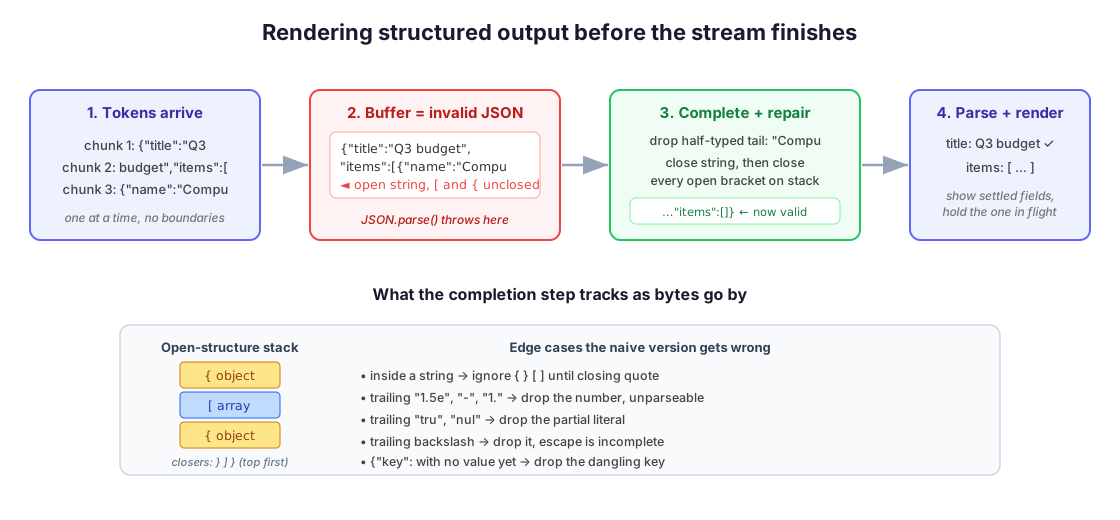
Completing the buffer
The core routine walks the buffer once and tracks two things: a stack of open containers, and whether the cursor is currently inside a string. Braces and brackets count only when you are not inside a string; otherwise a } in someone’s "name" value would throw off the balance. At the end, the function closes the open string, if there is one, then appends the missing closers, innermost first:
// Best-effort completion of a JSON prefix so JSON.parse can read it.
// Handles the reliable part: open strings and unclosed brackets.
function closeOpenStructures(buffer) {
  const closers = []; // stack of expected closers: '}' or ']'
  let inString = false;
  let escaped = false;

  for (const c of buffer) {
    if (inString) {
      if (escaped) escaped = false;
      else if (c === '\\') escaped = true;
      else if (c === '"') inString = false;
      continue;
    }
    if (c === '"') inString = true;
    else if (c === '{') closers.push('}');
    else if (c === '[') closers.push(']');
    else if (c === '}' || c === ']') closers.pop();
  }

  let out = buffer;
  if (escaped) out = out.slice(0, -1); // lone trailing backslash: escape unfinished
  if (inString) out += '"';            // close the open string
  while (closers.length) out += closers.pop(); // close containers, innermost first
  return out;
}
Run it on {"title":"Q3 budget","items":[{"name":"Compu and you get {"title":"Q3 budget","items":[{"name":"Compu"}]}, which parses into { title: "Q3 budget", items: [{ name: "Compu" }] }. The last item’s name is truncated, but the shape is intact and the earlier fields are correct. That is enough to render the title and the list scaffold now, and let the name fill in on the next chunk.
The escaped-quote handling is the part people skip and then spend an afternoon on. If the string content is path is C:\\ and the stream cuts after the backslash, appending a " produces C:\\". The closing quote is now escaped, so the string never terminates. Dropping a dangling backslash before closing avoids it, which is what the escaped check at the end does. The same care applies to a " inside string content: while inString is true, a quote closes the string and every brace between quotes is ignored. That is why the string check comes first in the loop.
Edge cases that still break the parse
Closing strings and brackets covers most frames, but a few trailing states still produce a string that won’t parse. Know these before you ship, because each one shows up as an intermittent parse error that reproduces only on specific content.
A number mid-type. This is the common one. A buffer ending in "amount": 1. or "amount": 4e closes into something like {"amount": 1.}, and -, 1., 4e, and 1e- are all incomplete numeric literals that JSON’s grammar rejects. Detect a trailing partial number and drop the whole "amount": 1. pair, along with the comma before it, so the object closes cleanly without that key.
A partial keyword. true, false, and null arrive character by character, so a buffer ending in tru or nul closes into {"active": tru}, which throws. Drop the partial literal and its key.
A dangling key or comma. {"title":"Q3", closes into {"title":"Q3",}, and the trailing comma is invalid JSON even though humans read it fine. Worse is {"title":"Q3","items":, a key with a colon and no value yet. Both cases mean trimming back to the last complete key/value pair before appending closers.
Handling all of this correctly means the completer stops being a 20-line function. You end up trimming a trailing token, re-checking, and trimming again, which is a small parser in its own right. That is the point where I stop hand-rolling.
When to reach for a library
The routine above is worth understanding because it tells you why a frame failed to parse, which you will need when debugging. For production, I lean on a dedicated partial-JSON parser rather than maintaining the edge cases myself:
- On the JS side,
partial-jsonparses an incomplete document directly and lets you choose, per type, whether a half-formed value is emitted or dropped. - If you are already on the Vercel AI SDK,
streamObjectand itsparsePartialJsonhelper do this internally and hand you a growing partial object on each chunk. That is the cleanest option when it fits your stack.
There is also an upstream fix worth knowing. OpenAI’s structured outputs constrain generation to a schema, so the model can’t emit a key that isn’t in your shape. That removes a class of structural surprises, but it does not remove the streaming problem. A schema-constrained response still arrives as a token prefix that is invalid until the closing brace, so you still have to complete the buffer to render it early. Schema constraints and partial parsing solve different halves.
Wiring it into a React render
With a completer in hand, the UI side is small. Accumulate chunks in a ref, run the completer plus JSON.parse on each one, and drop the frame if parsing still fails, since the next chunk usually fixes it:
function useStreamedObject(stream) {
  const [obj, setObj] = useState(null);
  const buffer = useRef('');

  useEffect(() => {
    (async () => {
      for await (const chunk of stream) {
        buffer.current += chunk;
        try {
          setObj(JSON.parse(closeOpenStructures(buffer.current)));
        } catch {
          // partial frame we can't repair yet; wait for more tokens
        }
      }
    })();
  }, [stream]);

  return obj;
}
The empty catch is deliberate: a frame that still can’t be repaired is skipped, and the last good object stays on screen. Two more things make this feel right instead of janky:
- Render only settled fields. A value that is still growing (the last array item, a string mid-word) should read as “loading”, not flash truncated text that rewrites itself every 50ms. I gate on whether a field is the last one being written, and hold its final render until it stops changing.
- Throttle the state updates. Parsing on every token is fine, but calling
setState200 times a second isn’t. Batching to one update per frame, or every ~60ms, keeps React from thrashing.
This is the same discipline I wrote about in streaming Markdown into a React UI, where the trap is also re-rendering faster than a human can read.
What I’d do differently
If I were starting fresh today, I’d reach for the library first. I’d drop to the hand-rolled completer only to debug a specific frame that wouldn’t parse. Writing it yourself teaches you the failure modes, but the number and keyword edge cases are exactly what a well-tested package already handles. Getting them subtly wrong means an intermittent bug that fires only on decimal amounts or boolean flags.
The other lesson: decide early whether you need JSON on the wire at all. A lot of “stream structured output” problems are really “stream a list of items”. A newline-delimited format (JSON Lines, one complete JSON object per line) sidesteps the whole completion dance. Each line is a complete object the moment its newline arrives, so you parse and render per line with no repair step.
I reach for partial-JSON completion when the shape is a single nested object that has to render as a tree, like the document plans in CloudCanvasAI or the token-aware context bundles in LLM DevMate. For a flat stream of results, JSON Lines is less code and has fewer edge cases.
Streaming looks like a frontend nicety and turns out to be a parsing problem. Once you treat the buffer as a prefix to complete rather than a document to validate, the rest falls into place. The preview fills in as the model thinks, which is the whole reason you streamed it.
Diagram by M. Hassan Ahmed, released under CC0. No external image was used for this post; the figure is original work by the author.