Async Connection Pooling in FastAPI
Your async FastAPI app stalls under load, then times out. Here is how SQLAlchemy pool_size and max_overflow really work, and how to size them for Postgres.

The first time a FastAPI service I ran fell over under load, nothing crashed. Requests just started hanging. A handful returned fast; the rest sat there for thirty seconds and then failed with QueuePool limit of size 5 overflow 10 reached, connection timed out. CPU was near idle, Postgres was fine, and the app was doing almost no work. It was waiting on itself.
That error means the connection pool has run out of connections to lend. It is one of the most common ways an otherwise healthy async backend falls apart, and the fix is not “make the pool bigger.” The fix is to understand what the pool does, so you can size it against the one hard limit that matters: how many connections Postgres will accept.
This post is for engineers building FastAPI backends on SQLAlchemy and Postgres who have hit a pool-exhaustion error, or want to avoid their first one. It covers the two settings that control the pool, how to size them against Postgres, stale connections, when to turn the pool off, and the failure modes I have hit in practice.
I ran the FastAPI service behind the CMS workflow operations console at CERN and the backend for Archi, the retrieval copilot. Both talk to databases on every request. Pool sizing never comes up in a demo, and then it decides whether your service survives its first busy afternoon.
Why pools exist: connections are expensive
Opening a Postgres connection is not free. It takes a TCP handshake, plus TLS if you use it, and on the server side Postgres forks a new backend process for each connection. Doing that per request would add tens of milliseconds and pile processes onto the database.
So SQLAlchemy keeps a set of open connections and lends them out. A request borrows one, runs its queries, and returns it. The connection stays open for the next borrower.
That borrowing is the whole game. With an async engine, SQLAlchemy manages it with an AsyncAdaptedQueuePool, which it selects automatically for create_async_engine. The plain QueuePool is not asyncio-safe, so you get the async-adapted one whether you ask for it or not.
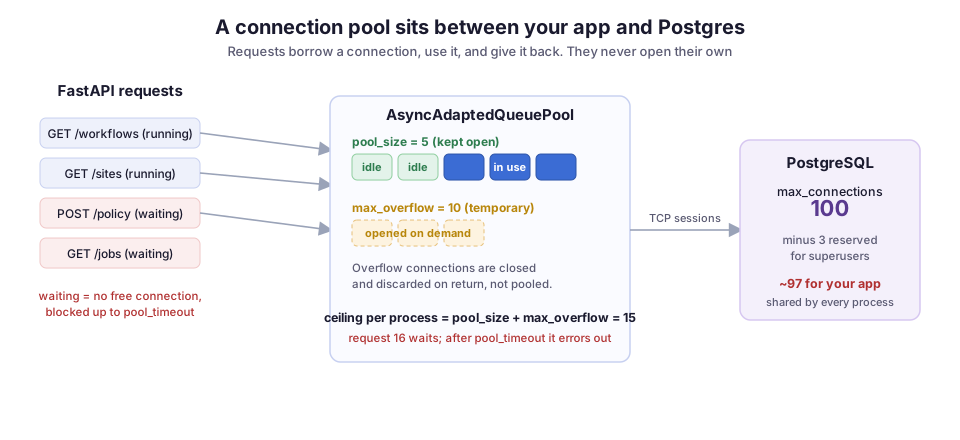
As the diagram shows, two numbers control the pool. Both have defaults you will outgrow.
poolsize and maxoverflow: the two numbers that set the ceiling
pool_size is how many connections the pool keeps open and ready. It defaults to 5. These connections are persistent: once opened, they stay in the pool between requests, so most checkouts (borrowing a connection from the pool) are instant.
max_overflow is how many extra connections the pool may open when all the persistent ones are busy. It defaults to 10. Overflow connections are temporary. When a request returns one and the pool already holds pool_size connections, the pool closes it instead of keeping it. Overflow is a burst valve, not extra capacity you get to keep.
So the real ceiling per pool is pool_size + max_overflow, which is 15 by default. Ask for a sixteenth concurrent connection and the pool has nothing to give. The request waits for up to pool_timeout, which defaults to 30 seconds. If no connection frees up by then, you get the timeout error I opened with.
Here is the engine and session setup I actually use. The comment on each line says what the setting is for:
from sqlalchemy.ext.asyncio import create_async_engine, async_sessionmaker

engine = create_async_engine(
    "postgresql+asyncpg://ops:***@db:5432/workflows",
    pool_size=10,        # persistent connections
    max_overflow=20,     # burst room; ceiling is 30 per process
    pool_timeout=10,     # fail fast instead of hanging for 30s
    pool_recycle=1800,   # recycle connections older than 30 min
    pool_pre_ping=True,  # check liveness before handing one out
)

AsyncSessionLocal = async_sessionmaker(engine, expire_on_commit=False)
I lowered pool_timeout to 10 seconds on purpose. A request that cannot get a connection in ten seconds is not going to have a good day at thirty. Failing fast turns a slow hang into a clean error the client can retry, and it keeps one stuck dependency from tying up every worker. pool_recycle and pool_pre_ping deal with stale connections, which get their own section below.
Size the pool against Postgres, not against your app
The trap is treating the pool size as a per-app setting. It is per process. Each Uvicorn or Gunicorn worker imports your module, calls create_async_engine, and gets its own independent pool. Run four workers and you have four pools, each able to open pool_size + max_overflow connections.
Postgres does not care how many pools you have. It enforces a single cluster-wide max_connections, which defaults to 100. About 3 of those are reserved for superusers, so roughly 97 are available to applications. That budget is shared across every process, every service, and every human running psql.
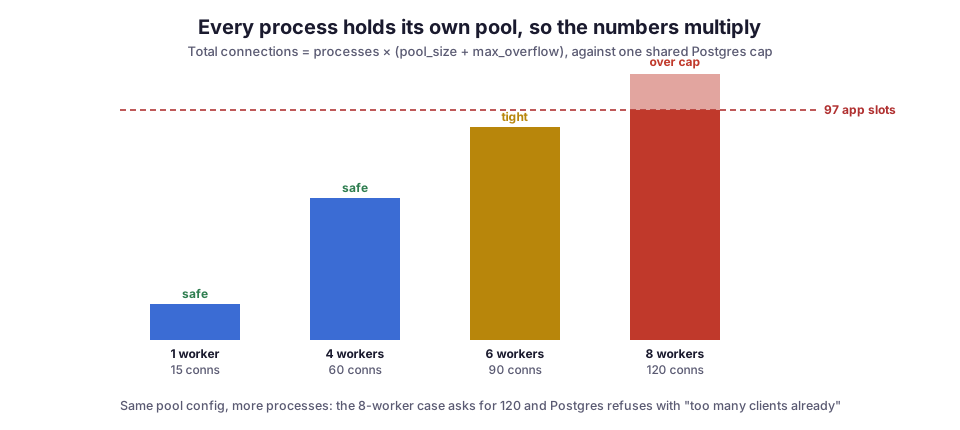
The arithmetic is unforgiving. With the config above (a ceiling of 30 per process) and 4 workers, you are asking for up to 120 connections from a database that will give you 97. That is before any background job, migration, or second service takes its share. The bar chart shows the same idea with the default settings. It stays green while the worker count is low, and then one deploy that bumps replicas tips you over into FATAL: sorry, too many clients already.
So size from the database backward. The total across all processes has to fit under the Postgres limit, with headroom left for everything else:
worker_processes x (pool_size + max_overflow) < max_connections - headroomTwo examples of that rule in practice:
- A service pinned at 4 workers against default Postgres:
pool_size=10, max_overflow=5gives a ceiling of 60, which leaves room for everything else. - A service that scales on Kubernetes, as I do for the operations console: replicas multiply too. 3 pods times 4 workers is 12 processes, and the pool numbers have to be small enough that twelve of them still fit.
This is the same “your local number multiplied by the fleet” mistake that shows up in Kubernetes memory limits, just with a different resource.
Stale connections: poolrecycle and poolpre_ping
A pooled connection can go bad while it sits idle:
- A firewall drops long-lived TCP sessions.
- Postgres restarts.
- A managed database fails over to a replica.
idle_in_transaction_session_timeoutcloses the connection on the server side.
The pool does not know any of this happened. It still thinks it holds a live connection, so it hands it to a request, and the query dies with a connection-reset error. The error looks random because it depends on how long the connection sat unused.
Two settings handle this:
pool_recyclesets a maximum connection age. A connection older than that is quietly replaced on its next checkout. The default is-1, meaning never, so on any real deployment set it below the shortest idle timeout in your network path. 1800 seconds is a safe start.pool_pre_pinggoes further. It runs a cheap liveness check before each checkout and swaps in a fresh connection if the old one is dead. It costs a tiny round trip per checkout, in exchange for never serving a broken connection to a user.
On managed Postgres, where failovers happen without warning, I keep both on.
When the pool is the wrong tool: PgBouncer and NullPool
PgBouncer and cloud poolers like RDS Proxy sit in front of Postgres and pool connections themselves. If you run one, you have two poolers stacked, and the outer one is where connection reuse should happen.
Running SQLAlchemy’s pool on top of PgBouncer in transaction mode causes a specific, confusing bug. asyncpg caches prepared statements per connection. In transaction mode, PgBouncer hands a different physical connection to each transaction, so the cached statement is not there. Under load, you get DuplicatePreparedStatementError or InvalidSQLStatementNameError.
The fix has two parts, and you need both:
- Turn off SQLAlchemy’s pool with
NullPool, so it opens and closes a connection per checkout and lets PgBouncer do the pooling. - Disable asyncpg’s statement caches, both of them. The second is an LRU cache that keeps the error rate nonzero if you only clear the first.
In the code below, poolclass=NullPool handles the first part, and the two connect_args entries set both caches to zero:
from sqlalchemy.pool import NullPool

engine = create_async_engine(
    "postgresql+asyncpg://ops:***@pgbouncer:6432/workflows",
    poolclass=NullPool,
    connect_args={
        "statement_cache_size": 0,
        "prepared_statement_cache_size": 0,
    },
)
If you are not behind an external pooler, do not reach for NullPool. You would pay the full connection cost on every request, which is the exact expense the pool exists to remove.
Failure modes I have actually hit
Sessions that outlive the request. The most common cause of exhaustion is not too many requests. It is a session that never gets returned. If you open a session and forget to close it (an early return, or an exception that skips your cleanup), that connection stays checked out forever. Use a dependency that closes it no matter what:
async def get_session():
    async with AsyncSessionLocal() as session:
        yield session
The async with returns the connection on both the success and the error path. Leaking one connection per failing request drains the pool in minutes, and the symptom (timeouts) points at the pool, not at the leak.
Blocking the event loop while holding a connection. Suppose a handler checks out a connection and then does something synchronous and slow, such as a requests call or a heavy CPU loop. It holds that connection the entire time and starves every other request of it. This is the connection-pool version of a problem I wrote about in blocking the FastAPI event loop: the pool is only as available as your slowest handler lets it be.
Long transactions. A connection stays checked out for the life of a transaction, not the life of a query. Open a transaction, call an external API for two seconds inside it, and that connection is unavailable for two seconds. Keep transactions short, and do slow I/O outside them.
Migrations and shells eat from the same 97. During a deploy, your migration tool and any open psql session count against max_connections too. Leave headroom so a routine migration during traffic does not push you over the edge.
What I would do differently
I would set pool_recycle and pool_pre_ping on day one, instead of adding them after the first mysterious connection reset in production. They cost almost nothing, and they remove a class of bug that is miserable to reproduce because it depends on idle timing.
I would also write down the connection budget somewhere visible, ideally as a comment next to the engine. The number that is safe today quietly becomes unsafe the moment someone adds a second service to the same database or bumps the replica count. Pool sizing is not a one-time decision. It is a shared budget against a fixed ceiling, and the failures come from forgetting that the ceiling is shared.
None of this is exotic. It is the boring plumbing under every FastAPI backend I’ve run, including the ones behind Archi and the CMS operations tooling. Getting it right is the difference between a service that degrades gracefully under load and one that hangs for thirty seconds and then gives up.
Diagrams by M. Hassan Ahmed, created for this post and released under CC0 (public domain). No external image was used.