Managing the Context Window in Long Agent Runs
An LLM agent that runs long enough fills its context window and starts to slow or fail. How to prune, compact, and offload context so agents keep going.

The tool-calling loop is deceptively simple. The model asks to call a tool, your code runs it, you feed the result back, and you repeat until the model is done. What that description leaves out is that the conversation you send back on every iteration keeps growing. By the tenth tool call you are shipping the system prompt, every prior message, and every tool result all over again, on top of whatever new work the model wants to do.
For short tasks this never matters. It matters a lot for an agent that grinds through a real job: read a file, grep for a symbol, run the tests, read the failure, patch, re-run. The transcript that started at a few thousand tokens is now a few hundred thousand, most of it stale tool output nobody will read again. Then one of two things happens. Either you hit the context window ceiling (the most tokens the model accepts in one request) and the request fails outright, or you stay under it and pay for a slow, expensive prompt on every single turn.
This post is for engineers who have an agent loop working and are now watching it get slower and pricier the longer it runs. I show why the window fills, the three levers you have to manage it (prune, compact, offload), and the failure modes each one introduces. The running example is Archi, the retrieval copilot I worked on for CMS computing operations at CERN. There, a single “why did this workflow stall” investigation can walk through a dozen logbook searches and Jira lookups before it has an answer.
Why the window fills
Two things drive the growth, and it helps to separate them.
The API is stateless, so you resend the entire history on every turn. This cause is structural. There is no server-side memory of the conversation. Turn six doesn’t send “here’s what’s new”; it sends turns one through five plus the new content. That is also why a long prompt is expensive to serve: the KV cache has to hold every token of that prompt in GPU memory while the model generates, and it grows linearly with the prompt length.
Most of the volume comes from tool results, not the model’s own words. A search_logbook call that returns forty hits, a read_file on a 600-line source file, a grep that matches eighty lines: each of those lands in the transcript and stays there. The model’s reasoning and your user messages are small by comparison.
The chart below is the shape I see in practice. The fixed cost (system prompt and tool definitions) is flat, the conversation grows slowly, and tool results are the wedge that eventually pushes the request into the ceiling.
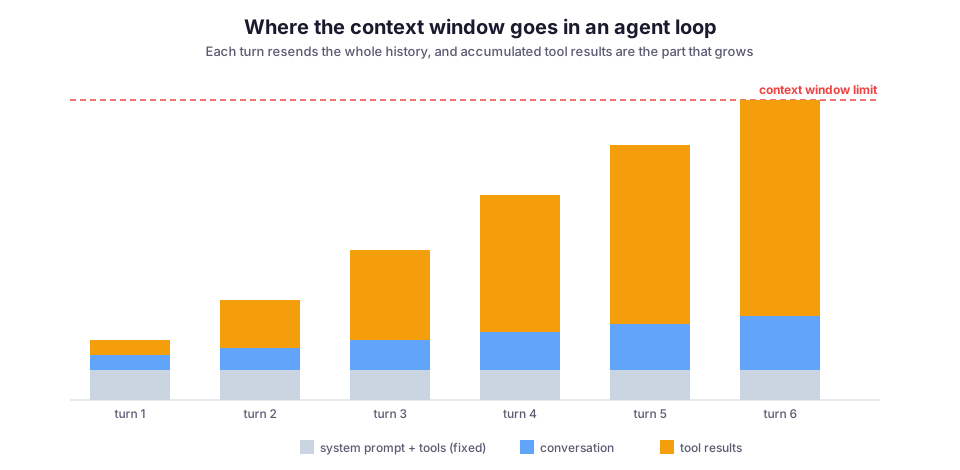
Once you see it this way, the outline of the fix is obvious. The tool results from ten turns ago are the cheapest thing to get rid of, because the model has already acted on them. The trick is doing that without breaking the conversation or throwing away the one detail you turn out to need.
Three levers: prune, compact, offload
You have three ways to make room. They trade off along the same axis: how much of the original information you keep versus how many tokens you save.
- Prune throws stale content away.
- Compact replaces a run of old turns with a summary.
- Offload moves the bulky data out of the transcript entirely and leaves a pointer behind.
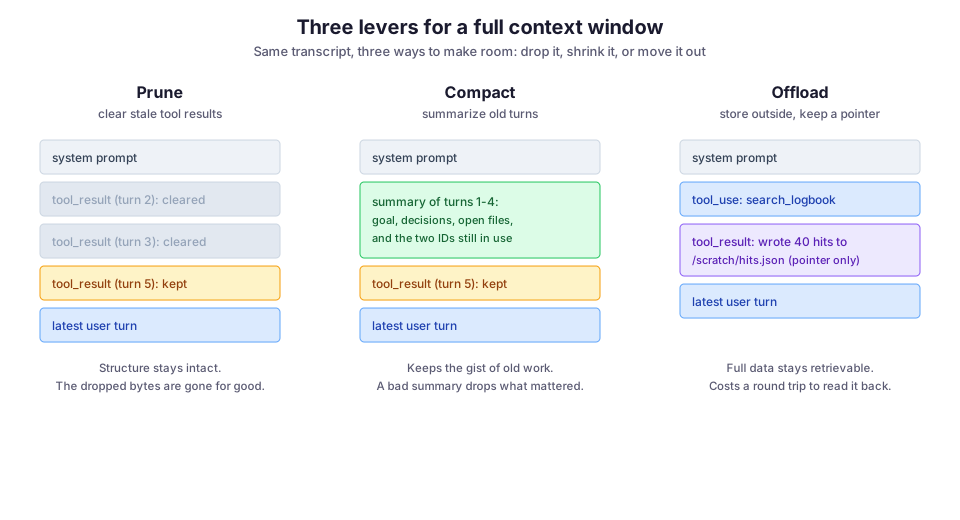
Most production agents end up using all three at different points, so it is worth understanding what each one costs.
Prune: clear old tool results
Pruning is the bluntest and safest lever. You walk the transcript, find tool results older than some threshold, and replace their content with a short placeholder. You keep the tool_use/tool_result structure so the message sequence stays valid, but you drop the body.
The Anthropic API exposes this directly as context editing. Pass a clear_tool_uses_20250919 strategy, as in the request below, and the server clears old tool results before the model sees them, on a threshold you set:
response = client.beta.messages.create(
    model="claude-opus-4-8",
    max_tokens=8000,
    betas=["context-management-2025-06-27"],
    context_management={
        "edits": [{"type": "clear_tool_uses_20250919"}]
    },
    tools=tools,
    messages=messages,
)
If you run the loop by hand instead of leaning on the server, the logic is the same: keep the last N tool results verbatim and blank the rest. This function walks the messages from newest to oldest and replaces the content of every tool result beyond the keep_last count:
def prune_tool_results(messages, keep_last=6):
    seen = 0
    for msg in reversed(messages):
        for block in msg.get("content", []):
            if isinstance(block, dict) and block.get("type") == "tool_result":
                seen += 1
                if seen > keep_last:
                    block["content"] = "[cleared: result dropped to save context]"
    return messages
Pruning keeps the conversation’s shape and the model’s reasoning intact. The cost is that the dropped bytes are genuinely gone. If turn twelve needs the exact error string from a grep at turn three and you cleared it, the model has to re-run the search. In Archi that is usually fine, because a logbook hit the model looked at eight steps ago rarely comes back. Tune keep_last to how far back your agent actually reaches.
Compact: summarize the old turns
Compaction is what you reach for when pruning isn’t enough: when the conversation itself is long and you are near the window limit, not just trimming fat. Instead of deleting old turns, you replace a run of them with a model-written summary of the goal, the decisions made, the files touched, and the identifiers still in play. The Anthropic compaction feature does this server-side, summarizing earlier context automatically as you approach a trigger threshold.
There is one detail that bites everyone the first time. The API hands the compaction back to you as a block in the response. You have to append the whole response.content to your message history, not just the text you extracted from it, which is what the last line of this snippet does:
messages.append({"role": "user", "content": user_input})

response = client.beta.messages.create(
    model="claude-opus-4-8",
    max_tokens=8000,
    betas=["compact-2026-01-12"],
    context_management={"edits": [{"type": "compact_20260112"}]},
    messages=messages,
)

# Preserve the whole content, not just response.content[0].text.
# The compaction block lives in here, and dropping it loses the state.
messages.append({"role": "assistant", "content": response.content})
Compaction keeps far more of the story than pruning does, which is exactly why it is riskier. A summary is a lossy re-encoding, written by the same class of model that sometimes hallucinates. If the summarizer decides the Jira ticket ID wasn’t important and leaves it out, that ID is now unrecoverable from the transcript, and the agent will confidently continue without it.
When I compact, I bias the summarization prompt toward keeping concrete artifacts (IDs, file paths, error codes, exact numbers) and letting the prose narration go. The narration is what the model can reconstruct; the identifiers are not.
Offload: keep the data, drop it from the prompt
The third lever attacks the problem at the source: don’t put the bulky result in the transcript at all. Have the tool write its output to a file or a store and return a short pointer, like “wrote 40 hits to /scratch/hits.json”, plus maybe the top result inline. The model reads the file back only if it needs the detail.
In the example below, the logbook search saves all its hits to a scratch file and returns only the count, the file path, and the top excerpt:
def search_logbook(query: str, limit: int = 40) -> dict:
    hits = logbook_index.query(query, k=limit)
    path = f"/scratch/{hash(query)}.json"
    Path(path).write_text(json.dumps([h.as_dict() for h in hits]))
    return {
        "count": len(hits),
        "saved_to": path,
        "top_hit": hits[0].excerpt if hits else None,
    }
This is the same instinct behind giving an agent a filesystem or a memory directory. It is where an agent stops being a chat loop and starts looking like a small program that keeps its working set on disk. Offloading also composes cleanly with retrieval and tool servers:
- A tool that already sits on top of a RAG index can return a handful of chunk IDs and let the model re-fetch specific ones, instead of dumping every retrieved passage into context.
- If you expose your data behind an MCP server, returning a resource URI the host can read on demand is offloading by another name.
The tradeoff is a round trip. Every time the model needs the full data, it has to spend a tool call to read the file back, which adds latency and one more turn. Offloading pays off when results are large and usually consulted once. It is a poor trade for small results the model references constantly.
Failure modes to watch for
Each lever has a way of going wrong quietly, and quiet is the dangerous part: nothing errors, the agent just gets subtly worse.
You cleared the thing you needed. The classic prune failure. The model re-runs a search it already ran because you dropped the result, and if that search isn’t deterministic, you can even get a different answer the second time. Watch for loops where the agent keeps re-fetching the same resource; that is usually a sign your keep_last window is too tight.
The summary drifted. After a compaction, the model is reasoning about a paraphrase of its own earlier work. Small omissions compound: a dropped constraint, a rounded-off number, a lost “we already tried X and it didn’t work.” The agent starts repeating dead ends. Keeping concrete artifacts verbatim in the summary is the main defense.
You broke the prompt cache. This one is about cost, not correctness. Prompt caching works on an exact prefix match: the cache is keyed on the bytes of the prompt up to a breakpoint. Compaction and aggressive pruning both edit history near the front of the transcript, and that invalidates the cache for everything after the edit. The next request then pays full price to re-read a prompt you thought was cached. If your bill jumps right after you turn on context management, this is why. Concentrate edits toward the older end and leave the recent, cacheable suffix alone where you can.
The model can’t find what’s in the middle. Even when everything fits, a very long context isn’t uniformly usable. Models are measurably better at recalling information at the start and end of a long prompt than in the middle, the “lost in the middle” effect documented by Liu et al. (2023). So a bloated transcript hurts recall even below the hard limit. That is an argument for keeping context lean whether or not you are near the ceiling.
What I would do differently
The mistake I made early on was treating this as one knob to turn at the end: “add compaction when it breaks.” It works better as a design choice made up front, per tool:
- Tools whose output is large and consulted once should offload by default. There is no reason a 600-line file read should ever sit in the transcript in full.
- Tools whose output is small and referenced often should stay inline.
Pruning and compaction then become the safety net for the conversation as a whole, not the primary strategy.
The other thing I would do sooner is measure. Log the token count of each request and where it comes from; input_tokens, cache_read_input_tokens, and cache_creation_input_tokens are all in the API response. Once you can see that 80% of a turn is stale tool results being re-read at full price, the right lever to pull is obvious. Before you can see it, every choice here is a guess.
Context management is the difference between an agent that answers a quick question and one that can actually work a long problem end to end. In Archi, and in CloudCanvasAI where the Claude Agent SDK drives multi-step document edits, the loop that survives a long session isn’t the one with the cleverest prompt. It’s the one that is deliberate about what it carries forward and what it lets go.