Prompt Caching: Cut LLM Cost and Latency
Prompt caching reuses a request's prefix to cut LLM cost and latency. How the prefix match works, where to put the breakpoint, and the silent cache misses.

From the model’s side, every turn of an agent looks roughly the same: a long system prompt, a list of tool definitions, a growing pile of prior messages, and one new instruction at the end. The new instruction is a few dozen tokens. Everything in front of it might be twenty thousand. On a naive setup you pay full input price for all twenty thousand on every single turn, because the API is stateless and you re-send the whole thing each time.
Prompt caching removes that tax. Instead of re-reading a prefix it has already processed, the provider keeps the computed state and reuses it, charging you a small fraction of the normal price for the cached span. In CloudCanvasAI, the system prompt plus the document-format skills make up the bulk of every request, and that part does not change between a user’s first message and their fortieth. Paying for it once instead of forty times was the difference between a demo and something I’d leave running.
This post is for engineers building anything that sends the model a large, mostly repeated prompt: agents, RAG copilots, chat backends, batch classifiers. The mechanism is simple once you see it. Most of the work is arranging your prompt so the cache can actually do its job, and that arrangement is also where the quiet failures live.
What is actually being cached
When a transformer reads your prompt, it computes a key/value tensor for every token and stacks them into the KV cache, the running state that lets each new token attend to everything before it. (I wrote about how that cache eats GPU memory in an earlier post on the KV cache.) Normally that state is thrown away when the request finishes.
Prompt caching is the provider deciding not to throw it away. It stores the KV state for a prefix of your prompt, keyed by the exact bytes of that prefix. On the next request that starts with the same bytes, it loads the stored state instead of recomputing it.
Note what is not cached: the response. Caching responses is a different technique, a semantic cache keyed by question similarity. Here you are caching the work of reading the input, so two requests with identical prefixes and completely different questions both benefit.
The one rule: the cache is a prefix match
Prompt caching is a prefix match. The cache key is the exact bytes of your prompt up to a marked point, and any change anywhere before that point invalidates everything after it.
That single sentence explains every win and every miss. The pieces of a request render in a fixed order (tools, then system prompt, then messages), and the cache reads left to right. Stable content near the front gets reused. A volatile byte near the front pushes every later byte to a new position, and the match breaks.
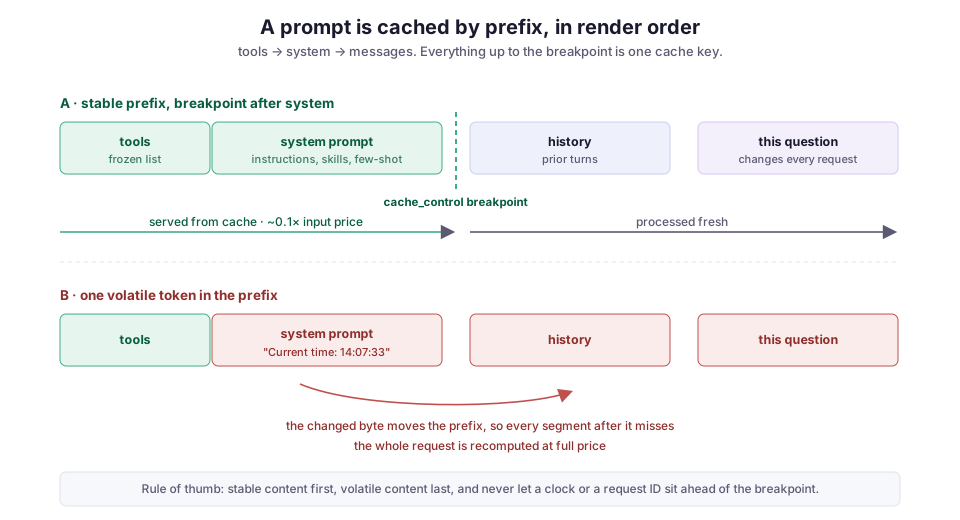
Get the ordering right and caching mostly works for free. Get it wrong and no amount of configuration will save you, because the bytes you needed to match against have moved.
Turning it on: marked or automatic
The ergonomics differ by provider, and they split into two camps: some make you mark the cache point, and some cache automatically.
On Anthropic’s Messages API you place a cache_control breakpoint (a marker meaning “cache everything up to here”) on the last block you want cached. Because tools render first, a marker on the final system block caches the tools and the system prompt together:
resp = client.messages.create(
    model="claude-opus-4-8",
    max_tokens=1024,
    system=[
        {
            "type": "text",
            "text": LARGE_SYSTEM_PROMPT,   # frozen: instructions, skills, few-shot
            "cache_control": {"type": "ephemeral"},   # <- everything up to here is the key
        }
    ],
    messages=[{"role": "user", "content": user_question}],  # volatile, after the breakpoint
)
You get at most four breakpoints per request, and the default entry lives for five minutes. There’s also a one-hour option that costs more to write.
The other two major providers take different approaches:
- OpenAI’s prompt caching is automatic. There is no marker; it caches long prefixes on its own and discounts the cached tokens.
- Google’s Gemini context caching goes the other way. You explicitly create a cached-content handle and reference it.
The underlying idea is identical across all three. Only the knob changes.
Where to put the breakpoint
Placement is the whole game, and three patterns cover most cases.
A large system prompt shared across many requests. Put the breakpoint on the last system block. Tools and system prompt cache as one unit, and every request that reuses them reads from the cache instead of writing to it. This is the CloudCanvasAI case, and the most common one.
A multi-turn conversation. Put the breakpoint on the last block of the most recent turn. Each new request reuses the entire prior conversation as its cached prefix, and hits accumulate as the conversation grows: turn five reads turns one through four, turn six reads one through five.
A shared preamble with a varying question. This is the one people get backwards. Suppose many requests share a big fixed block (retrieved documents, few-shot examples) and differ only in the final question. Put the breakpoint at the end of the shared part, not the end of the whole prompt. If you mark the end of the whole prompt, every request has a unique suffix, so every request writes a fresh entry and nothing is ever read. The breakpoint has to sit on the boundary between what repeats and what doesn’t.
The economics, and where break-even is
The prices are what make this worth the trouble:
- A cache read costs roughly a tenth of the normal input price.
- A cache write costs a bit more than normal, about 1.25× for the five-minute entry, because the provider is doing the work and storing the result.
So the first request is slightly more expensive than not caching at all, and every request after that is dramatically cheaper.
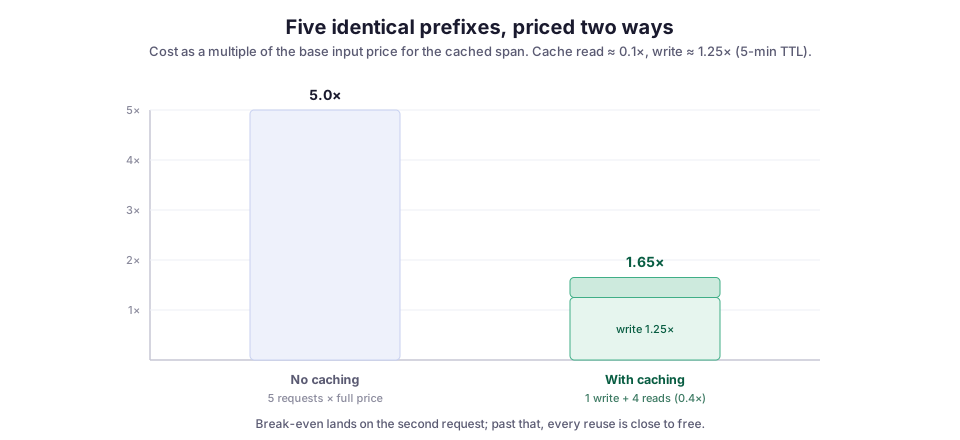
The break-even is the second request. Cache a prefix on the first send, and by the time you send it again you’re already ahead; from there the savings compound. For a prefix reused across five requests, the illustrative math is 1.25 + 4 × 0.1 = 1.65× against an uncached 5.0×. For an agent that sends the same system prompt across a fifty-turn session, the gap is not close.
Latency improves along with cost. Reading a cached prefix skips the prefill compute (the model’s first pass over the input) for those tokens, so time-to-first-token drops on every cached turn. In an interactive product, that drop is what you feel, more than the invoice.
The silent cache misses
This is the part that costs people money without any error to point at. You add cache_control, the request succeeds, and your bill doesn’t move, because something in the prefix changes on every request and the match never lands. I’ve either shipped or reviewed every one of these:
- A clock in the system prompt.
f"Current time: {datetime.now()}"at the top of the prompt is the classic. It changes on every request, sits ahead of everything, and invalidates the entire cache. Inject dynamic context after the breakpoint instead, as a later message, not in the frozen header. - A request ID or UUID near the front. Same failure, same fix.
- Non-deterministic serialization.
json.dumps(config)withoutsort_keys=True, or anything that iterates aset, produces different bytes for the same data. The prefix differs even though the content is identical. - A per-user system prompt. Interpolating the user’s name or ID into the system prompt gives every user a private prefix and kills all cross-request sharing for them.
- Changing the tool list or the model mid-session. Tools render at position zero, so adding, removing, or reordering a tool invalidates the whole cache. Switching models does too, since caches are per-model. Sort your tool definitions deterministically and hold the set stable.
A subtler structural miss: the lookback window. A breakpoint only looks back a limited number of content blocks to find a prior cache entry (around twenty on Anthropic). An agent turn that appends dozens of tool-call and tool-result blocks can blow past that window. The next request’s breakpoint then finds nothing and silently misses. In long, tool-heavy turns, drop in an intermediate breakpoint every dozen or so blocks.
How to catch a silent miss
Read the response. The usage object tells you exactly what happened to the input tokens, split three ways:
u = resp.usage
print(u.cache_creation_input_tokens)  # tokens written this request (~1.25x)
print(u.cache_read_input_tokens)      # tokens served from cache (~0.1x)
print(u.input_tokens)                 # processed at full price
If cache_read_input_tokens stays at zero across repeated requests you believe share a prefix, something is invalidating the cache. Diff the rendered bytes of two consecutive requests and the culprit is usually obvious. It’s almost always a timestamp.
The RAG trap: caching the part that never repeats
RAG systems get prompt caching subtly wrong, and the case is worth its own section because the intuition points the wrong way.
The instinct is to cache the retrieved context, since that’s the biggest part of the prompt. But retrieved chunks are chosen per query. They’re the most volatile part of the request, different for nearly every question, so caching them buys almost nothing: the prefix rarely repeats.
What does repeat is the system prompt, the tool definitions, and any fixed instructions or few-shot examples. That’s what belongs before the breakpoint. The retrieved chunks and the user’s question go after it, where they’re supposed to change.
In Archi, the RAG copilot I worked on for CMS operations at CERN, the stable instruction block is what earns the cache. The retrieved logbook and ticket snippets are recomputed on every query by design, because they’re different on every query. Trying to cache the retrieved half is how you add cache_control, see no change in cost, and conclude caching “doesn’t work.” It works. You just cached the one part that never repeats.
What I’d reach for, and when
Turn it on by default for any workload with a large repeated prefix. The write premium is real but tiny, and it pays for itself on the second request. Unless a prefix is genuinely used once, there’s no reason to leave caching off. That covers essentially every agent and chat backend, including the tool-calling loop, where the tool definitions and system prompt are re-sent on every hop of the loop.
Freeze the front of your prompt, and treat that as an architectural rule, not a caching tweak. No clocks, no per-request IDs, no per-user interpolation, and no reordered JSON ahead of the breakpoint. If you need dynamic context, it goes after the cache point. Serialize tools deterministically and don’t swap them mid-session.
Verify with the usage numbers instead of trusting that it worked. The whole feature is invisible when it fails. The only signal you get is a cache_read_input_tokens that stubbornly reads zero.
Skip scheduled pre-warming for a service with steady traffic. If real requests arrive more often than the cache lives, they keep it warm on their own, and a separate warm-up call is just an extra write. Pre-warming earns its place only when there’s a gap before traffic starts (a cold start, a deploy, the top of a scheduled window) and a user actually feels first-request latency.
None of this is exotic. It’s the same discipline as any cache: put the stable thing where it can be reused, keep the volatile thing out of the key, and measure the hit rate instead of assuming it. An LLM prompt just happens to be a cache key you assemble by hand, one content block at a time: the same prompt-assembly path behind the MCP tool server and the context bundling in LLM DevMate, anywhere the model reads far more than it writes.