Kubernetes Probes: Liveness, Readiness, Startup
Kubernetes has three health probes and mixing them up causes outages. How liveness, readiness, and startup probes work, and the failure modes to avoid.

The worst outages I have seen on Kubernetes were not caused by an app crashing. They were caused by the health check meant to protect the app. A dependency gets slow, and every pod’s liveness probe starts failing at once. The kubelet (the agent on each node that runs the containers) restarts every container at once. Now a service that was merely degraded is fully down and restart-looping. The probe did exactly what you told it to. You just told it the wrong thing.
The confusion is almost always the same. People treat the three probes as three flavors of “is it healthy,” when they answer three different questions and trigger three different actions. This post is for engineers running services on Kubernetes who configured probes by copying a YAML block and now want to know what each one actually does, when it fires, and how it turns into an outage. I ran the Kubernetes side of the CMS workflow operations stack at CERN, and getting probes right is a large part of what makes a rollout safe instead of hopeful.
Three probes, three questions
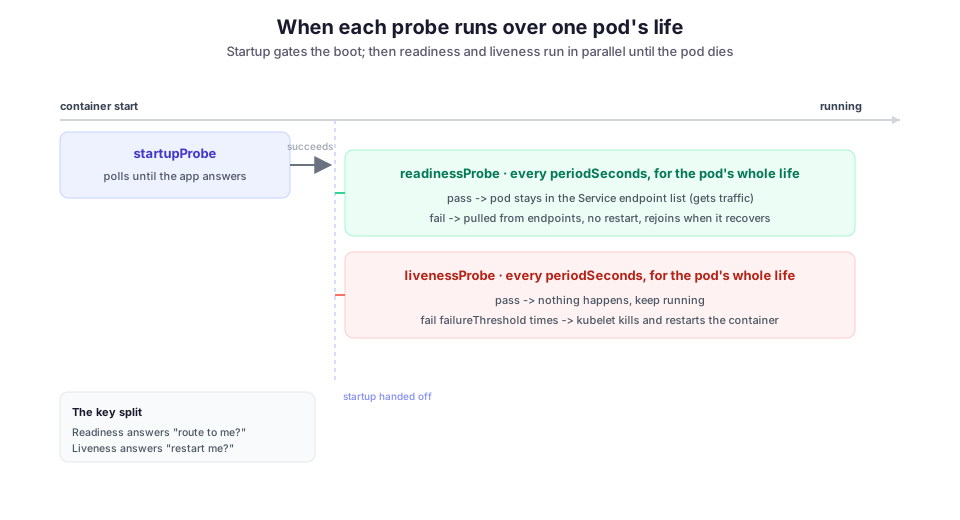
Kubernetes gives every container up to three probes, and the trap is that they look interchangeable. They are not. Each one controls a separate decision:
readinessProbeanswers “should traffic go to this pod right now?” It controls whether the pod is in the Service’s endpoint list, the set of pods the Service routes to. Fail it and the pod is pulled from the load balancer. It is not restarted.livenessProbeanswers “is this container wedged badly enough to restart?” Fail it enough times and the kubelet kills and restarts the container.startupProbeanswers “has this container finished booting yet?” While it runs, the other two probes are held off. It exists so liveness does not kill a slow-starting app before the app is even up.
The one thing to hold onto: readiness moves traffic, liveness restarts the process. One is about routing; the other is about the container’s life. Once that split is clear, most probe bugs become obvious.
Readiness gates traffic, and your rollout
Readiness is the probe you almost always want, and the one with the least downside. When a pod is not ready, kube-proxy removes it from the Service endpoints, so no new request is routed to it. When it recovers, it rejoins. Nothing is restarted, and nothing is lost. It is a clean way for a pod to say “hold on, I am warming a cache” or “my downstream is briefly unavailable, don’t send me work I’ll just fail.”
A typical readiness probe polls a dedicated HTTP endpoint every five seconds and marks the pod not-ready after three failures in a row:
readinessProbe:
  httpGet:
    path: /healthz/ready
    port: 8080
  periodSeconds: 5
  failureThreshold: 3
The part people miss is that a rolling update watches readiness too. A Deployment does not consider a new pod available until it passes readiness. It also will not scale down the old ReplicaSet (the pods running the previous version) faster than new pods report Ready. That is the mechanism that stops a deploy from swapping healthy pods for pods that cannot serve yet. ArgoCD blocks on the same signal when it decides a resource is Healthy before advancing to the next sync wave. A wrong readiness probe does not just misroute traffic; it stalls the rollout that depends on it.
So the readiness endpoint should check what this pod needs to serve its own requests: is the HTTP server listening, is the local cache warm, is the DB connection pool initialized. Keep it honest and keep it cheap, because it runs every few seconds for the life of the pod.
Liveness is the one that bites
Liveness is for exactly one situation: the process is running but stuck in a state it cannot get out of on its own. Think of a deadlock, a wedged event loop, or a thread pool that will never drain. For that, a restart is the only cure, and liveness is the right tool. The Kubernetes docs are blunt: if your process crashes when it hits a fatal error, you may not need a liveness probe at all, because the kubelet already restarts a container that exits.
Liveness causes outages because a restart is a heavy, destructive action, and the probe puts that action on a timer. Two mistakes turn the timer against you.
Checking a shared dependency inside the liveness probe. Suppose /healthz pings the database, and the database gets slow. Every pod fails liveness at the same time, and Kubernetes restarts all of them at once. A restarting pod cannot serve, so you have turned a slow dependency into a total outage. Worse, the restarts add load to the very dependency that was struggling. The official guidance is explicit: a liveness check must look only at the state inside this container. Whether a downstream is reachable belongs in readiness, if anywhere.
A timeout too tight for a loaded process. timeoutSeconds defaults to 1. A busy service under garbage-collection (GC) pressure or CPU saturation can take longer than a second to answer even a trivial handler. That starts a chain reaction:
- The probe times out, and the pod gets restarted.
- The restart drops in-flight work and adds a cold-start spike.
- That makes the next pod slower, which trips its probe.
That is a restart storm. It looks exactly like an application failure until you notice the restarts are perfectly periodic. The liveness config below avoids both mistakes: it hits a cheap endpoint with no downstream calls, and it allows a generous timeout.
livenessProbe:
  httpGet:
    path: /healthz/live   # cheap, no downstream calls
    port: 8080
  periodSeconds: 10
  timeoutSeconds: 5       # generous; a slow answer is not a dead process
  failureThreshold: 3     # ~30s of sustained failure before a restart
My default now is to give liveness a wide margin, or to skip it and let the kubelet’s normal behavior restart a crash-on-fatal app. A liveness probe should fire when the process is genuinely unrecoverable, not when it is having a bad few seconds under load.
startupProbe: for apps that boot slowly
Liveness and slow startup pull in opposite directions. You want liveness to notice a wedge quickly, so its detection window (failureThreshold × periodSeconds) is short. But some apps take a minute to load a model, warm a JIT compiler, or run migrations. During that minute, a short-fused liveness probe will kill them before they finish, forever.
The old fix was a big initialDelaySeconds, which is a bad trade. Set it too short and you kill slow boots. Set it too long and you delay detection of a genuine wedge for the whole life of the pod.
The startupProbe resolves this. While the startup probe is running, the liveness and readiness probes are disabled. Once it succeeds, it never runs again, and the other two take over. So you give startup a long total budget for the boot, and liveness a short, aggressive one for steady state. This startup probe allows up to 30 checks, ten seconds apart:
startupProbe:
  httpGet:
    path: /healthz/started
    port: 8080
  periodSeconds: 10
  failureThreshold: 30    # 30 * 10s = up to 5 minutes to boot
That config tolerates a five-minute cold start and still lets liveness react within thirty seconds once the app is up. You cannot express that with initialDelaySeconds alone, which is the whole reason the startup probe exists.
The timing knobs, and what they actually mean
Every probe shares the same timing fields. The defaults surprise people, so here they are plainly (reference):
initialDelaySeconds(default0): wait this long before the first probe. Prefer astartupProbeover a large value here.periodSeconds(default10): how often the probe runs.timeoutSeconds(default1): how long to wait for a response before counting it as a failure. The default of one second is the value most commonly left too low.failureThreshold(default3): consecutive failures before the probe’s action fires. Your real reaction time isfailureThreshold × periodSeconds, not one period.successThreshold(default1): consecutive successes needed to count as passing again after failing. Must be1for liveness and startup.
The handler can be an httpGet, a tcpSocket, an exec, or a grpc check. Prefer a dedicated HTTP endpoint you control over a TCP check, which only proves the socket is open. Reserve exec probes for cases with no network handler, since forking a process every few seconds across a fleet is not free.
Where it breaks
One /health endpoint wired into all three probes. This is the most common mistake, and the root of the cascade above. If a single endpoint checks everything, readiness, liveness, and startup all make the same decision. The moment a downstream blips, pods get pulled from traffic and restarted. Split them: /started, /ready, and /live should answer different questions and touch different things.
Liveness that checks the same downstream as readiness. If a pod’s readiness depends on a downstream that is down, the pod correctly leaves the load balancer. That is fine. But if liveness also checks that downstream, the pod is now on a restart timer for an outage it did not cause and cannot fix by restarting. Keep the downstream check out of liveness, so a pod can sit quietly un-ready and rejoin the instant the dependency returns.
Probes that lie because they are too shallow. A tcpSocket probe passes as soon as the port is open, which can happen before the app can serve a single request. A pod that reports Ready but 500s every request is worse than one that honestly reports not-ready, because the rollout will happily replace healthy pods with it. Make the readiness handler exercise enough of the real request path to mean something.
Forgetting that reaction time is a product. A probe with periodSeconds: 30 and failureThreshold: 3 takes up to ninety seconds to act. People set those numbers thinking about probe cost, then get surprised by how slowly a failure is detected. Decide how fast you need to react first, then pick the period and threshold that get you there.
What I would do differently
Early on I reached for liveness probes reflexively, on the theory that more health checking is safer. It is the opposite. Every liveness probe is a standing instruction to restart the container under some condition, and a restart is the most disruptive thing you can do to a running service. Now I start every service like this:
- A good readiness probe, and no liveness probe.
- A startup probe, if the app boots slowly.
- Liveness only once I can name the specific unrecoverable state it is meant to catch.
If I cannot name that state, the probe should not exist.
The other habit worth building is treating restarts as a first-class signal. A container that restarts on a clean, regular interval is almost never crashing on its own. It is being killed by a liveness probe, and the regularity is the tell. I push pod restart counts and probe failures into the same dashboards I described in OpenSearch dashboards for workflow monitoring. That way “why is this service flapping” becomes a graph instead of a kubectl describe archaeology session.
Where this runs
This is the probe setup behind the WMCore and Unified operations services that schedule Monte Carlo production and reconstruction for the CMS experiment across the Worldwide LHC Computing Grid. Moving those services onto Kubernetes and ArgoCD is what made safe updates and fast rollbacks possible, and probes are a quiet but load-bearing part of that. Readiness is why a rollout waits for a pod to actually serve before shifting traffic. The discipline of not over-using liveness is why a slow database means a slow afternoon instead of a cluster-wide restart storm. Health checks are supposed to be the thing that catches a problem early. Configured carelessly, they are the problem.
Diagrams by M. Hassan Ahmed, made for this post.
Image credit: Diagrams created by M. Hassan Ahmed for this post, released under CC0 (public domain).