Prompt Caching with the Claude API
Prompt caching reuses a stable prompt prefix to cut Claude API cost and latency. How breakpoints, TTLs, and cache reads work, and what quietly breaks a hit.

Most of the tokens in an LLM request are the same tokens you sent last time. Take CloudCanvasAI, where Claude edits .docx and .pptx files inside a per-user sandbox. Every turn carries the same system prompt, the same tool descriptions, and a growing conversation history. The only genuinely new part is the last thing the user typed. Re-sending the rest on each request means paying to re-read a document that hasn’t changed.
Prompt caching fixes that. You mark a stable chunk of the request once, and Anthropic keeps its processed form around for a few minutes. The next request that starts with the same bytes skips that work.
This post is for engineers already calling the Claude API who want to cut cost and time-to-first-token on repeated calls without changing what the model sees. I’ll cover what actually gets cached, the exact price of a hit versus a miss, and the handful of ways people break caching without noticing.
What actually gets cached: a prefix
The cache is a prefix match. Anthropic renders every request into one ordered sequence: tools first, then system, then messages. Caching keys off that sequence from the start up to a marker you place, and everything before the marker is the cached prefix. Change a single byte anywhere inside that prefix and the match fails from the point of the change onward, so the model reprocesses the rest.
That ordering is the whole game. Stable content has to come first. Volatile content (the new user question, a per-request id, anything with a timestamp) has to come after the last marker. Get the order wrong and you cache nothing.
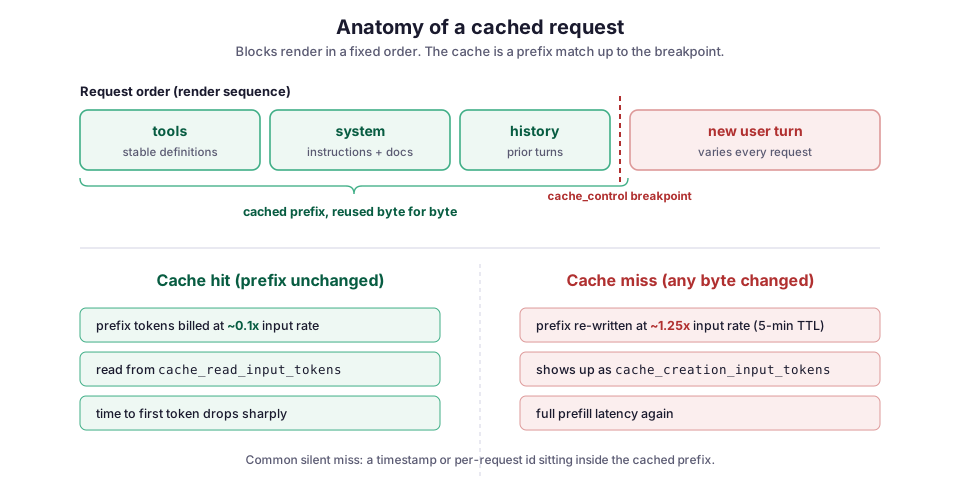
The marker is a cache_control entry of type ephemeral. It doesn’t cache a specific block in isolation. It caches the whole prefix up to and including that block.
Turning it on
The simplest form marks a stable system prompt. In the example below, the style guide and format rules are the same on every request, so they go in system with a cache_control marker. The user’s turn stays in messages, after the marker, where it belongs.
from anthropic import Anthropic

client = Anthropic()

SYSTEM_DOCS = load_style_guide()  # ~8k tokens, identical every request

resp = client.messages.create(
    model="claude-opus-5",
    max_tokens=4096,
    system=[
        {
            "type": "text",
            "text": SYSTEM_DOCS,
            "cache_control": {"type": "ephemeral"},
        }
    ],
    messages=[{"role": "user", "content": user_turn}],
)
The default cache lifetime, or TTL (time to live), is five minutes, and every hit inside that window resets the clock. If your traffic is bursty enough that requests land more than five minutes apart, you can ask for a one-hour lifetime by adding a ttl to the marker:
"cache_control": {"type": "ephemeral", "ttl": "1h"},The minimum prefix length
One detail trips people up: there’s a minimum prefix length. Prompts shorter than the model’s floor won’t cache at all, and you get no error. The request just runs uncached.
The floor depends on the model: 512 tokens on Claude Opus 5, 1,024 on Sonnet, and higher on some older models. The current table is in the prompt caching docs. If you’re caching a short prompt and seeing no savings, this is usually why.
Caching a growing conversation
An agent loop is where caching earns the most, because the history only grows. The trick is to move the breakpoint forward each turn. Put it on the last message that won’t change again, so the cached prefix keeps extending as the conversation does.
You get up to four breakpoints per request. A common layout uses:
- one on the tool definitions,
- one on the system prompt,
- one that trails the conversation.
The snippet below sets that trailing breakpoint. It marks the last block of the existing history, then appends the new user turn after it:
messages = build_history()          # everything so far
messages[-1]["content"][-1]["cache_control"] = {"type": "ephemeral"}
messages.append({"role": "user", "content": new_turn})  # uncached tail
Because the new user turn sits after the marker, it never invalidates the cached history behind it.
What a hit and a miss actually cost
The numbers are what make this worth doing. Relative to the base input token price, the official multipliers are:
- Writing tokens into the five-minute cache costs 1.25×.
- Reading them back on a hit costs 0.1×.
- The one-hour cache writes at 2×, and reads still cost 0.1×.
Work through the break-even. Without caching, two identical-prefix requests cost 1× + 1×. With caching, the first writes the prefix (1.25×) and the second reads it (0.1×), so the same two calls cost 1.25× + 0.1× = 1.35×.
A single reuse inside the window already comes out ahead, and the gap only widens from there. Ten reads is 1.25× + (10 × 0.1×) = 2.25× against 11× uncached. The extra quarter you pay on the write is bought back on the first hit.
The other half of the payoff is latency. A cache read skips the prefill work (the model’s first pass over the input) for that prefix, so time-to-first-token drops on long prompts. In a streaming UI like CloudCanvasAI’s split-panel view, that’s the difference between the response appearing to start immediately and a visible pause while the model re-reads context it already had.
If you want the background on why prefill is the expensive part, I wrote about the KV cache and GPU memory separately. Prompt caching is essentially Anthropic holding that computed state for you between requests.
Where it quietly breaks
Every failure mode here has the same symptom: the request works, the answer looks fine, and you’re paying full price because nothing hit the cache. None of these raise an error.
A timestamp in the prefix. The classic one. Something like f"Current time: {datetime.now()}" at the top of the system prompt changes the first bytes on every request, so the prefix never matches. If the model genuinely needs the time, put it after the last breakpoint, in the user turn.
Non-deterministic serialization. Say part of your prefix is JSON built from a dict. Python doesn’t guarantee the same key order across all the code paths that might construct it, and a reordered key is a different byte string. Serialize anything that lands in a cached block with json.dumps(obj, sort_keys=True).
A tool list that shifts. Because tools renders first, reordering tools or regenerating their descriptions invalidates everything after them, the system prompt and the whole conversation included. Build the tool array in a fixed order and keep the descriptions stable. I ran into a version of this with LLM DevMate. A tool set that’s stable across a session caches well. One rebuilt per request from a set or a dict throws the order away and quietly costs you the cache.
Letting the window lapse. On the five-minute cache, a gap longer than the TTL means the next request pays for the write again. That’s fine for chat, but wasteful for a batch job that pauses between items. Either keep requests flowing or reach for the one-hour TTL.
Confirm it’s working
Don’t assume. The usage object on every response splits the input tokens into three buckets and tells you exactly what happened:
u = resp.usage
print(u.input_tokens)                  # uncached tokens, full price
print(u.cache_creation_input_tokens)   # written to cache this request (1.25x)
print(u.cache_read_input_tokens)       # served from cache (0.1x)
The signal you want is cache_read_input_tokens climbing on repeated requests. If it stays at zero across calls you believe share a prefix, one of the invalidators above is at work. Start by diffing the exact bytes of two consecutive prefixes.
On the first request with a fresh prefix, you’ll see cache_creation_input_tokens populated and reads at zero. That’s expected, since something has to write the cache before anything can read it.
Tradeoffs, and what I watch
Caching isn’t free to reason about. Three things are worth keeping in mind:
- Single-use prefixes are a small loss. Because of the write premium, caching a prefix you’ll use exactly once costs slightly more than not caching. Be honest about your reuse pattern before marking everything
ephemeral. - Low-traffic endpoints may never hit. If requests arrive minutes apart, they may never see a hit on the default TTL.
- The cache is scoped to a model. A mid-conversation switch to a different model, or an effort change, starts a new cache namespace. A routing layer that shuffles models per request can forfeit the reuse you were counting on.
The mental model that keeps me out of trouble is to treat the prefix as immutable and design the request around it: freeze the system prompt, fix the tool order, sort any serialized structure, and shove every varying byte past the last breakpoint. Once the prefix is genuinely stable, caching is close to free money on any workload that repeats it. For the LLM tooling I’ve built around CloudCanvasAI and Archi, that’s nearly all of them.
If you’re wiring this into a service, it pairs naturally with the retry and backoff patterns I covered earlier. A cached prefix makes a retried request cheaper too, since the retry reads the same cache the first attempt wrote.