Rate Limiting a FastAPI Service with a Token Bucket
Add per-user rate limiting to a FastAPI backend with the token bucket algorithm: an in-process version, an atomic Redis script, 429s, and the failure modes.

Most of my FastAPI services sit in front of something expensive: a model call that costs real money per request, a vector search that pins a CPU, or a document render inside a sandbox. One enthusiastic client with a for loop can run up a bill or starve everyone else before you notice. The fix is boring and old: cap how fast any single caller can hit the endpoint.
I wrote earlier about surviving an LLM provider’s rate limits from the client side, which means backing off when they send you a 429 (“Too Many Requests”). This post covers the other end of that pipe. Here you are the API, and you decide who gets a 429 and when. The algorithm I keep reaching for is the token bucket, because it handles the case that matters in practice: a client that is usually quiet but occasionally needs to fire a short burst.
This is for engineers running a FastAPI backend who want per-user throttling that works across more than one worker process. I build it in-process first, because that version is easy to reason about. Then I move the state into Redis once we hit the wall that in-process state always hits, wire it into FastAPI, and go through the failure modes.
Why a token bucket and not a simple counter
The naive approach is a fixed window: count each user’s requests per minute and reset the counter at the top of the minute. It works until you look at the boundary between windows. A client can send a whole minute’s allowance in the last second of one window, then the whole next allowance in the first second of the next. So 100/minute becomes 200 requests in two seconds across the seam, and the counter never notices.
The token bucket fixes that with two independent knobs:
- A bucket holds up to
Ctokens (its capacity). - Tokens refill at
rper second, up to that cap (the refill rate). - Every request takes one token. If the bucket is empty, the request is refused.
Capacity controls how big a burst you tolerate, and the refill rate controls the sustained pace. They are separate on purpose, which is what makes the algorithm worth its small amount of extra code.
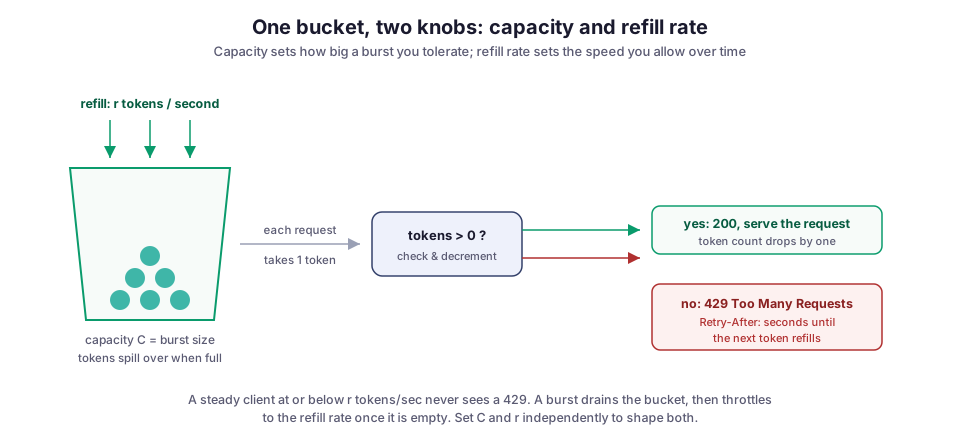
A client sending requests at or below r per second never empties the bucket and never sees a limit. A client that spikes drains the bucket to zero, gets served for the length of that burst, and is then throttled to the refill rate until it eases off. That shape matches real traffic far better than a hard per-minute cap. It is why the token bucket shows up everywhere, from network shapers to the rate limiters that big APIs run in front of their edge.
The in-process version
Start with a single class. It stores a token count and the timestamp of the last refill. Instead of running a background timer to add tokens, it refills lazily: when a request arrives, it adds the tokens earned since the last refill. Lazy refill keeps this cheap, because you only do arithmetic when a request actually shows up.
import time
from dataclasses import dataclass

@dataclass
class TokenBucket:
    capacity: float      # burst size, C
    refill_rate: float   # tokens per second, r
    tokens: float = None
    updated: float = None

    def allow(self, cost: float = 1.0) -> bool:
        now = time.monotonic()
        if self.tokens is None:
            self.tokens, self.updated = self.capacity, now

        # refill for the time that passed, capped at capacity
        elapsed = now - self.updated
        self.tokens = min(self.capacity, self.tokens + elapsed * self.refill_rate)
        self.updated = now

        if self.tokens >= cost:
            self.tokens -= cost
            return True
        return False
Two decisions in there are deliberate:
- Monotonic time. I use
time.monotonic()rather than wall-clock time. The wall clock can jump backwards on an NTP (network time) correction, which can hand a client free tokens or, worse, produce a negative elapsed value. - A
costparameter. Not every request is equal. A cheap health check and a call that triggers a 30-second model generation should not draw the same single token. Passing a cost lets you charge the expensive route more.
This class is genuinely useful for a single-process service or a quick local guard. It is also a trap, and the trap has a specific shape.
Where in-process state falls apart: more than one worker
The moment you run more than one worker, that dictionary of buckets is per-process. Uvicorn with four workers, or three replicas behind a load balancer, means three or four independent copies of every client’s bucket. Each copy enforces the limit you set. So your real limit is the configured limit times the number of workers, and it drifts every time you scale.
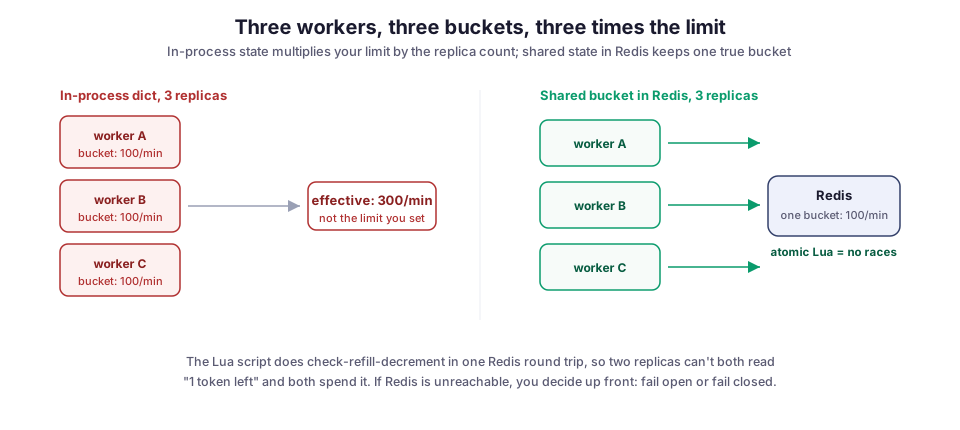
The fix is to move the bucket out of the process and into a store every worker shares. Redis is the usual choice. It is fast, and more importantly here, it can run a script atomically. That atomicity is the whole game: the check (“do I have a token?”), the refill, and the decrement have to happen as one indivisible step. If two workers both read “1 token left” and both decide they can spend it, you have handed out two tokens where you had one. Under real concurrency, that race fires constantly.
Moving the bucket into Redis with a Lua script
A Redis Lua script runs on the server without interruption from other commands, so one worker’s read-refill-write cycle can’t interleave with another’s. Redis even documents a token bucket limiter as a recommended pattern.
Here is the script I use. It reads the stored tokens and timestamp, refills against the server’s own clock, and decrements if it can (or works out how long the caller must wait). It also sets a TTL (time to live) on the key, so idle buckets evict themselves instead of leaking keys forever.
-- KEYS[1] = bucket key (e.g. "rl:user:42")
-- ARGV[1] = capacity, ARGV[2] = refill_rate/sec, ARGV[3] = cost
local capacity = tonumber(ARGV[1])
local rate     = tonumber(ARGV[2])
local cost     = tonumber(ARGV[3])

-- one clock for every worker: Redis' own TIME, not the app server's
local t   = redis.call('TIME')
local now = tonumber(t[1]) + tonumber(t[2]) / 1000000

local state  = redis.call('HMGET', KEYS[1], 'tokens', 'ts')
local tokens = tonumber(state[1])
local ts     = tonumber(state[2])
if tokens == nil then
  tokens, ts = capacity, now
end

local tokens = math.min(capacity, tokens + math.max(0, now - ts) * rate)

local allowed, retry_after = 0, 0.0
if tokens >= cost then
  tokens  = tokens - cost
  allowed = 1
else
  retry_after = (cost - tokens) / rate     -- seconds until enough refills
end

redis.call('HSET', KEYS[1], 'tokens', tokens, 'ts', now)
redis.call('EXPIRE', KEYS[1], math.ceil(capacity / rate) + 1)
return {allowed, tostring(tokens), tostring(retry_after)}
Reading the clock with redis.call('TIME'), instead of passing the time in from Python, is a small choice that removes a whole class of bug. Every worker now measures elapsed time against the same clock, so a few seconds of skew between app servers can’t leak or eat tokens. Redis returns integers cleanly but not floats, which is why the token count and retry hint come back as strings for the caller to parse.
The Python side registers the script once and then calls it. register_script handles the EVALSHA caching: it sends the script body over the wire once and references it by hash after that. take_token then parses the three results back into a boolean and two floats.
import redis

pool = redis.Redis(host="localhost", port=6379, decode_responses=True)
_take = pool.register_script(LUA)   # LUA = the script above, as a string

def take_token(key: str, capacity: float, rate: float, cost: float = 1.0):
    allowed, tokens, retry_after = _take(keys=[key], args=[capacity, rate, cost])
    return bool(int(allowed)), float(tokens), float(retry_after)
Wiring it into FastAPI with a dependency
FastAPI’s dependency system is the natural place for this. A dependency runs before the handler, can read the request, and can abort with an HTTPException before any expensive work starts. That last part matters: you want to reject a throttled request before it reaches the model call, not after.
The dependency below keys each client by API key (or IP as a fallback), takes a token, and either raises a 429 or reports the remaining budget in a header:
import math
from fastapi import Depends, FastAPI, Request, Response, HTTPException

app = FastAPI()

BURST = 20        # capacity: allow a short spike of 20
RATE  = 5.0       # 5 tokens/sec sustained -> 300 requests/min

def rate_limit(request: Request, response: Response):
    client = request.headers.get("x-api-key") or request.client.host
    key = f"rl:{client}"
    try:
        allowed, tokens, retry_after = take_token(key, BURST, RATE)
    except redis.RedisError:
        return  # Redis down: fail open, don't take the whole API down with it

    if not allowed:
        raise HTTPException(
            status_code=429,
            detail="rate limit exceeded",
            headers={"Retry-After": str(math.ceil(retry_after))},
        )
    response.headers["X-RateLimit-Remaining"] = str(int(tokens))

@app.post("/generate", dependencies=[Depends(rate_limit)])
async def generate(prompt: str):
    return await run_expensive_model(prompt)
Two response details are worth getting right:
- A 429 with
Retry-After. Sending429 Too Many Requestswith aRetry-Afterheader, which is standardized in RFC 9110, tells a well-behaved client exactly when to come back. Otherwise it has to guess, and it will hammer you. X-RateLimit-Remainingon success. This header is a convention, not a standard, but it is a common one. It lets a client throttle itself before it trips the limit at all.
A request you never have to reject is cheaper than the fastest 429.
Failure modes I’ve actually hit
Redis being down. The dependency above fails open: if Redis is unreachable, requests pass. That is the right default for most public APIs, where a rate-limiter outage taking down the whole service is worse than briefly not enforcing limits. But it is a real decision. If you are protecting something where an unbounded burst is dangerous, fail closed instead and return 429 or 503 when the limiter can’t answer. Pick one on purpose and write down why, because the default you fall into by accident is rarely the one you’d choose.
Choosing the wrong key. request.client.host is easy and often wrong. Behind a load balancer or proxy, it may be the proxy’s IP, so every client shares one bucket and one noisy user throttles everyone. If you terminate TLS at a proxy, read the real client from a trusted forwarded header, and only one you set yourself. For authenticated traffic, key on the API key or user id rather than IP. That is the thing you actually want to limit, and it doesn’t break for users behind a shared NAT.
Counting requests when the cost is tokens. For an LLM endpoint, one request is not one unit of load. A 200-token completion and a 4,000-token one hit your budget very differently. This is the same trap I described in the provider rate-limit post, just on the serving side. If you limit request count while your real constraint is tokens per minute, a few large requests blow the budget while the request counter looks calm. The cost parameter is the hook for this. Charge each route its rough expected cost, and cap the genuinely heavy work with a separate, smaller bucket.
Blocking the event loop. redis-py is synchronous. Calling it straight from an async endpoint parks the whole event loop on a network round trip, which is exactly the blocking-the-event-loop problem I’ve written about. Use redis.asyncio so the limiter check is awaited like everything else on the path.
How it compares with other rate-limiting algorithms
Token bucket is not the only option, and it is not always the right one. Two alternatives come up most often:
- Sliding-window log. It stores a timestamp per request and counts the ones inside the window. It is exact and makes no compromise at window boundaries, but it stores O(requests) data per client, which gets expensive under load.
- Leaky bucket. It enforces a perfectly smooth output rate with no burst at all. That is what you want when feeding a downstream system that truly can’t spike, and the wrong choice when a bursty client is normal and fine.
The Redis rate-limiting guide walks through several of these side by side.
I default to token bucket because most of my traffic is bursty but bounded: a user opens a page, fires a handful of requests, then goes quiet. Capacity absorbs the handful, the refill rate holds the long-run average, and the memory cost is two numbers per client. When I’ve needed strict smoothing into a fragile downstream, I’ve switched to leaky bucket for that hop specifically and kept token bucket at the edge.
What I’d do differently
The mistake I made the first time was hard-coding one limit for the whole service. Real endpoints don’t deserve the same budget. A login route and a document-generation route have completely different cost profiles, and one global bucket either throttles the cheap route too hard or lets the expensive one run free. Now I parameterize the dependency, so Depends(rate_limit) becomes a small factory that takes capacity and rate per route group. Same script, same Redis, different knobs.
I’d also add the X-RateLimit-* response headers from the start rather than bolting them on later. Once clients can see how much budget they have left, the well-behaved ones pace themselves, and your 429 rate drops on its own. It’s a few lines that pay for themselves in support tickets you never get.
Closing
This limiter is a small piece of plumbing in front of the expensive parts of my projects: the FastAPI backends behind Archi, CloudCanvasAI, and Gemini Alchemy. There, a request can mean a model call, a sandboxed render, or a retrieval over a large index, and none of those should discover their load profile from a runaway client. Two knobs, one atomic script, and a 429 that tells the caller when to try again cover the case surprisingly well. The whole thing is short enough to read in one sitting.
Image credit: token bucket diagrams by M. Hassan Ahmed, created for this post, released under CC0 1.0 (public domain).