ArgoCD ApplicationSets: One Template, Many Clusters
ArgoCD ApplicationSets generate one Application per cluster or environment from a single template. How the generators work, a Git example, and where they bite.

I wrote earlier about sync waves, which order the resources inside one ArgoCD Application. That post ended on a caveat. Waves say nothing about ordering across Applications, and nothing about the case that gets tedious first: running the same app in more than one place.
That case appears the moment you have a second cluster. You copy the Application manifest, change the destination server and the name, maybe change one value in the Helm overrides, and commit. Now there are two. Then a third region comes online, and a fourth, and every change to the base config has to be made in every copy by hand. Miss one, and that cluster drifts. This is the copy-paste problem. GitOps (managing deployments declaratively from Git) makes it worse, because the copies all sit in Git looking authoritative while slowly disagreeing with each other.
This post is for people already running ArgoCD who have several Application manifests that are basically the same, with the knobs set differently. That might be one app across many clusters, or many similar apps in one cluster. ApplicationSets are the tool for this. They have been bundled into ArgoCD itself since version 2.3, so there is nothing extra to install on a current cluster. I cover:
- what the ApplicationSet controller actually does;
- the generators worth knowing;
- a Git-driven example I would actually ship;
- the failure modes, one of which can delete things you did not mean to delete.
What an ApplicationSet is: a factory for Applications
An ApplicationSet is a custom resource that produces Application resources. It is a factory, not a deployment. It has two halves:
- a set of generators, which emit parameters;
- a template, which is an
Applicationmanifest with placeholders in it.
The controller runs the generators, gets back a list of parameter sets, and renders the template once per set. Three parameter sets in, three Applications out. The normal ArgoCD you already run then owns and reconciles those Applications. The ApplicationSet controller only keeps the existence of each Application in step with what the generators say should exist.
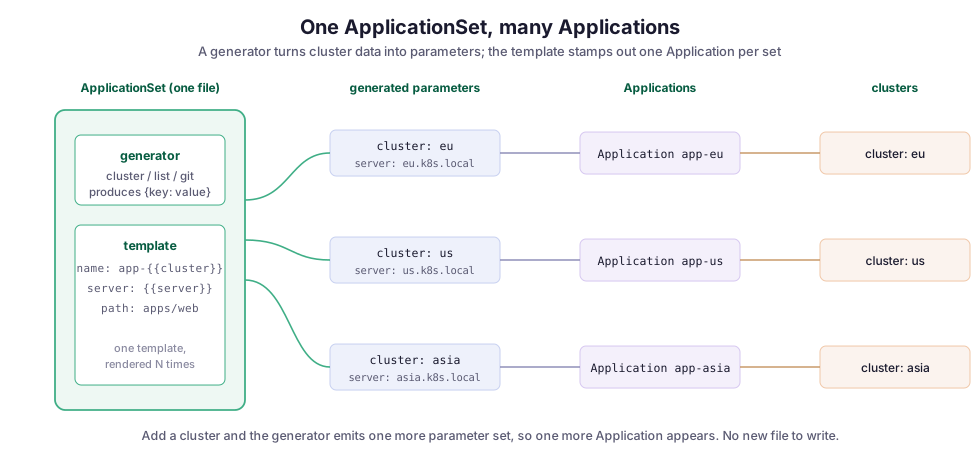
The important shift is where the list of targets lives. Without an ApplicationSet, the list of “which clusters run this app” is implicit, spread across N hand-written files. With one, that list is data the generator reads, and the Applications are a pure function of it. Register a new cluster, and the cluster generator emits one more parameter set, so one more Application appears on its own. You did not write it; the controller did.
The generators, and which ones you actually need
ArgoCD ships several generators: List, Cluster, Git, Matrix, Merge, SCM Provider, Pull Request, and Cluster Decision Resource. You do not need all of them. In practice, three do most of the work.
List: write the parameter sets yourself
The List generator is the literal case. You write out each parameter set by hand, as in this two-cluster example:
generators:
  - list:
      elements:
        - cluster: eu
          server: https://eu.k8s.internal
        - cluster: us
          server: https://us.k8s.internal
This is honest and readable, and it is the right choice when the list is short and rarely changes. Its weakness is that it is still a hand-maintained list. It does not really solve the drift problem; it moves it into one file instead of many. That is an improvement, but not the end state.
Cluster: generate from registered clusters
The Cluster generator reads the clusters ArgoCD already knows about (the ones you registered as destinations) and emits one parameter set per cluster. You can filter with label selectors, so an app lands only on clusters labelled, say, region=eu or env=prod. This generator makes “deploy to every production cluster” a property of your cluster inventory instead of a list you edit. Add a cluster with the right labels, and the app follows.
Git: generate from the repository
The Git generator reads a Git repository and generates parameters from what it finds, in one of two modes:
- Directory mode emits one parameter set per directory matching a glob. This suits a monorepo where each subdirectory is an app or an environment.
- File mode reads config files (JSON or YAML) matching a glob and pulls parameters out of each one. This is the pattern I use most, shown in the next section.
The Git generator makes the desired state fully declarative. The repository becomes the source of truth for what exists, not just for how each piece is configured.
The specialised generators
The rest are for specific needs:
- Matrix and Merge combine other generators. Matrix multiplies them; Merge overlays one on another.
- SCM Provider and Pull Request talk to a code-hosting platform such as GitHub to discover repositories or open PRs. That is how you get an ephemeral preview environment per pull request.
- Cluster Decision Resource hands the “which clusters” decision to an external controller.
Use these when you have the specific need. The first three cover the everyday cases.
A file-per-environment setup I would actually ship
This is the pattern I trust for running one service across several environments. A directory in Git holds one small config file per environment, and a Git file generator turns each file into an Application. The layout looks like this:
envs/
  dev/config.json
  staging/config.json
  prod/config.json
Each config.json holds only what differs between environments. Here is the production one:
{
  "env": "prod",
  "server": "https://prod.k8s.internal",
  "replicas": 6,
  "valuesFile": "values-prod.yaml"
}
The ApplicationSet reads those files. Its generator globs envs/*/config.json, and its template fills the Application name, Helm values file, and destination server from each file’s fields:
apiVersion: argoproj.io/v1alpha1
kind: ApplicationSet
metadata:
  name: workflow-console
  namespace: argocd
spec:
  goTemplate: true
  generators:
    - git:
        repoURL: https://github.com/example/deploy.git
        revision: HEAD
        files:
          - path: "envs/*/config.json"
  template:
    metadata:
      name: "workflow-console-{{.env}}"
    spec:
      project: default
      source:
        repoURL: https://github.com/example/deploy.git
        targetRevision: HEAD
        path: charts/workflow-console
        helm:
          valueFiles:
            - "{{.valuesFile}}"
      destination:
        server: "{{.server}}"
        namespace: workflow-console
      syncPolicy:
        automated:
          prune: true
          selfHeal: true
Adding an environment is now a single step: create envs/qa/config.json and commit. The generator sees a new file and emits a new parameter set. A workflow-console-qa Application appears, syncs, and self-heals like the others. Nobody edited the ApplicationSet, and that is the property you are paying for.
Two details in that manifest matter:
goTemplate: trueswitches the placeholders to Go text/template syntax. Turn it on: it gives you conditionals, defaults, and functions instead of the older bare{{param}}substitution. On a current ArgoCD, it is the syntax to standardise on.- The
automatedsync policy sits on the generated Application, so each environment reconciles itself. The ApplicationSet only decides which Applications exist, not whether they are in sync.
Matrix: powerful, and the first place people get burned
Sometimes you need the cross product of two axes, such as every app on every cluster. The Matrix generator combines two child generators and emits a parameter set for each pair.
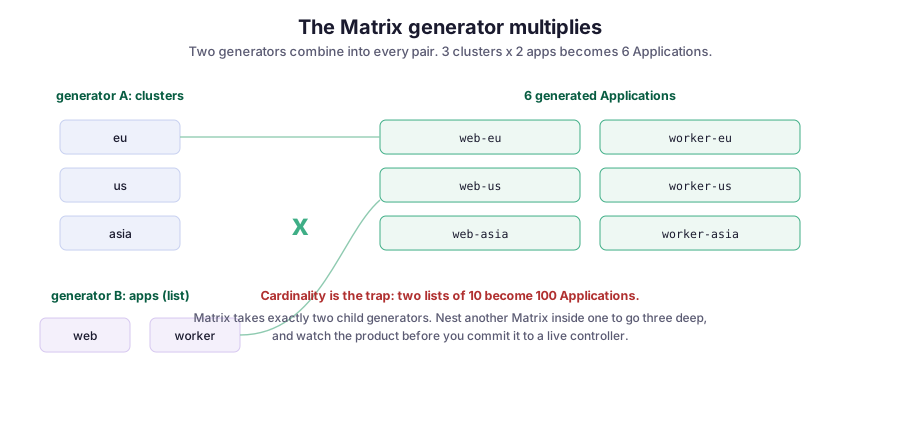
The trap is in the word multiplies. Three clusters and two apps make six Applications, which is fine. Ten clusters and ten apps make a hundred Applications from one file, and a hundred syncs the first time it reconciles.
Matrix takes exactly two child generators. You get a third axis by nesting another Matrix inside one of them, and the product compounds fast. Before you apply a Matrix generator to a live controller, multiply the numbers out by hand and make sure the result is a number you meant.
Where it breaks
A generator that stops emitting a parameter set deletes the Application. This surprises people, and it is the most important point in this post. By default, the controller keeps the set of Applications exactly in step with the generator output. That means it creates, updates, and deletes. Remove a directory the Git generator was reading, or narrow a cluster label selector, and the matching Applications are pruned. Because those Applications had their own automated sync, their live resources go with them. If the generator input hiccups and briefly returns nothing, the controller can try to delete everything at once.
Two guards exist, and both are worth knowing:
- An applications sync policy can stop the controller from deleting. With
create-updateit only creates and updates; withcreate-onlyit never even updates. preserveResourcesOnDeletionkeeps the underlying workloads alive even when their Application is removed.
On anything near production, I set the policy to non-destructive first and only loosen it once I trust the inputs.
A bad template change rolls out everywhere at once. The flip side of a single template is that a mistake in it lands in every generated Application simultaneously. There is no limit on the blast radius. This is where the sync waves and health checks from the earlier post matter more, not less. It is also where a canary label selector, which renders the change to one cluster before the rest, earns its place.
The Git generator polls; it is not instant. The generators do not watch Git in real time. The ApplicationSet controller re-runs them on an interval (three minutes by default), so a committed change takes a moment to produce a new Application. If you want it prompt, set up the ArgoCD webhook so that a push notifies the controller immediately. Many “my new environment did not appear” bug reports are just the poll interval.
ApplicationSets do not order Applications against each other. This is the same boundary from the sync-waves post. An ApplicationSet decides which Applications exist; it does not sequence them. If your database Application must be healthy before the app Applications sync, you need an app-of-apps setup or another dependency mechanism. A generator cannot express it.
AppProject and RBAC still apply. A generated Application is a normal Application, so its AppProject restrictions on source repos, destinations, and resource kinds still apply. If an ApplicationSet generates Applications that point at a cluster the project does not allow, those Applications will not sync. The error shows up on the child Application, not on the ApplicationSet. When a generated app refuses to deploy, check the project before you suspect the template.
Tradeoffs, and what I would do differently
The honest cost of an ApplicationSet is a layer of indirection. You no longer read a file and see the Application. You read a template and a generator and hold the cross product in your head. For two near-identical Applications that rarely change, that indirection is not worth it; two hand-written files are clearer. The pattern pays off once the count grows, once the list changes often, or once “we forgot to update one” has actually happened to you. Below roughly three copies, I would still write them out.
What I would tell my earlier self is to start non-destructive. The first time I let a Git generator drive deletions, an input mistake removed an Application I wanted. The automated sync cleaned up its resources before I noticed. So set the sync policy to create-and-update only, get comfortable with how the generators behave on real inputs, and enable pruning deliberately once you trust it. The default is convenient, and it is also the sharpest edge in the tool.
Where this runs
This matters to me because CMS computing does not run on one cluster. The WMCore and Unified operations stack I maintained schedules Monte Carlo production and reconstruction across the Worldwide LHC Computing Grid, a large collection of sites rather than a single place. The operational services on top of it are exactly what you want defined once and generated per target, instead of copied and left to drift.
ApplicationSets are the “which Applications exist” half of that story. Sync waves are the “in what order each one comes up” half. Together, they turn a deploy across many clusters into something I can reason about from one file, instead of something I hope stayed consistent across a dozen.
Diagrams by M. Hassan Ahmed, created for this post, released under CC0 (public domain). No external image was used.