LLM Quantization: INT8, GPTQ, and AWQ Explained
The weights don't fit on the GPU you have. How LLM quantization shrinks them to INT8 or INT4, why GPTQ and AWQ beat naive rounding, and where it breaks.

A 70B model in fp16 is 140 GB of weights. That is two 80 GB A100s, minimum, before you have spent a single byte on activations or cache. Quantize those weights to 4 bits and the same model is about 35 GB, which fits on one card with room to serve. Nothing about the model’s job changed. You changed how many bytes each number takes.
In an earlier post about the KV cache, I separated two kinds of GPU memory: the weights are the fixed cost, and the cache is the variable one. That post was about taming the variable part. This one is about the fixed part, because the fixed part is often what stops you from loading the model at all.
This post is for engineers who run or serve open-weight models and keep hitting the memory ceiling: the model that needs two cards when you’d rather use one, the 13B you want on a 24 GB consumer GPU, the deployment where halving memory means halving the bill. It covers how quantization works, why naive rounding breaks at 4 bits, how GPTQ and AWQ fix that, which formats to actually use, and where it all goes wrong.
I did this arithmetic on the GPU side of the CMS workflow tooling I maintained, and on Archi, the retrieval copilot. There, fitting a stronger model on the same card is usually a better answer than fitting a weaker one with headroom to spare.
The arithmetic that forces the decision
Every weight is a number, and every number takes some bytes. That is the whole cost model:
weight memory = num_params x bytes_per_paramThe bytes_per_param term is the only knob quantization turns:
- full precision (fp32) is 4 bytes;
- the standard serving format, fp16 or bf16, is 2;
- int8 is 1;
- int4 is half a byte.
Put a 70B model through that ladder:
| Precision | Bytes/param | 70B weights |
|---|---|---|
| fp32 | 4 | 280 GB |
| fp16 / bf16 | 2 | 140 GB |
| int8 | 1 | 70 GB |
| int4 | 0.5 | ~35 GB |
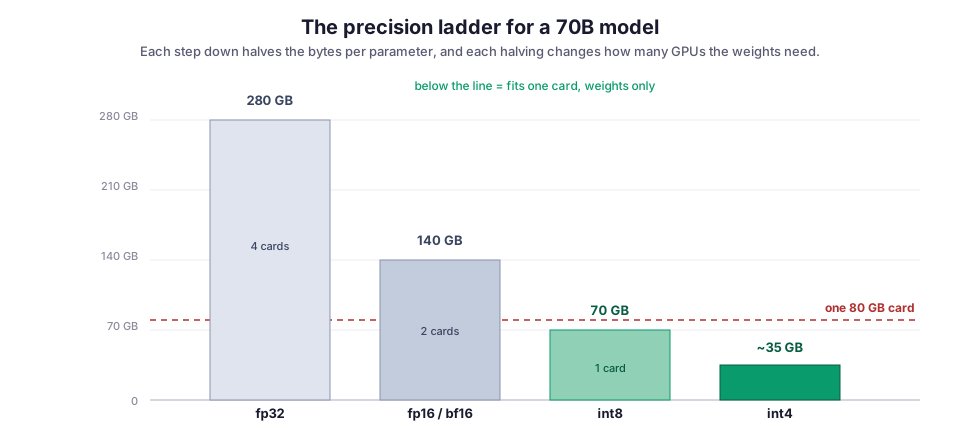
The int4 numbers are slightly optimistic in practice. Quantization stores a few extra numbers per block (a scale, sometimes a zero-point) and usually leaves some layers at higher precision, so call it 40 GB rather than 35. The shape holds: each rung down the ladder roughly halves the footprint. Each halving is the difference between one card and two, or between the GPU you have and the one you were about to buy.
What quantization actually does
Underneath the acronyms, quantization is one idea: take a block of high-precision weights and map them onto a small grid of integers, keeping just enough metadata to map back. For each block:
- Find the range of the weights.
- Pick a
scalethat spreads the integer grid across that range. - Round each weight to the nearest grid point.
The absmax version for int8 (named for using the block’s largest absolute value) is short enough to read in one sitting. quantize_int8 divides by the scale, rounds, and clamps to the int8 range; dequantize_int8 multiplies back:
import torch

def quantize_int8(w: torch.Tensor):
    # one scale for the whole block, symmetric around zero
    scale = w.abs().max() / 127.0
    q = torch.round(w / scale).clamp(-127, 127).to(torch.int8)
    return q, scale

def dequantize_int8(q: torch.Tensor, scale: float):
    return q.to(torch.float16) * scale
That scale is the whole trick. It is one fp16 number that lets you reconstruct 8-bit approximations of every weight in the block. The finer the blocks, the better the fit, and the more scales you store:
- Per-tensor quantization uses one scale for an entire weight matrix. Cheapest, least accurate.
- Per-channel uses one scale per row.
- Per-group splits each row into groups of 64 or 128 and gives each group its own scale.
Group size is the accuracy-versus-overhead dial, and 128 is the common default.
One detail decides most of the tradeoffs below. For the big open-model quantizers, this is weight-only quantization. The weights sit in memory as int4 or int8, but the actual matrix multiply still happens in fp16: each block is dequantized back to fp16 on the fly, multiplied, and discarded. So you save memory and memory bandwidth, but the compute is unchanged, and the dequantize step is not free. Hold that thought for the failure modes.
Round-to-nearest, and where it falls apart
Round-to-nearest (RTN), the code above, is the naive baseline. At 8 bits it mostly works: 256 levels is a fine enough grid that the rounding error stays in the noise for most models. At 4 bits there are only 16 levels, and it starts to hurt. On large language models it hurts more than the bit count alone predicts, and the reason has a name.
Dettmers and colleagues, in LLM.int8() (NeurIPS 2022, arXiv:2208.07339), showed that transformers past a few billion parameters develop outlier features. These are a small number of activation channels whose magnitudes are far larger than everything around them, and which carry a disproportionate share of the model’s behavior.
When one giant value shares a block with normal-sized ones, it stretches the range. The scale balloons to cover it, and every ordinary weight collapses onto a handful of grid points. You quantized the whole block to protect one number.
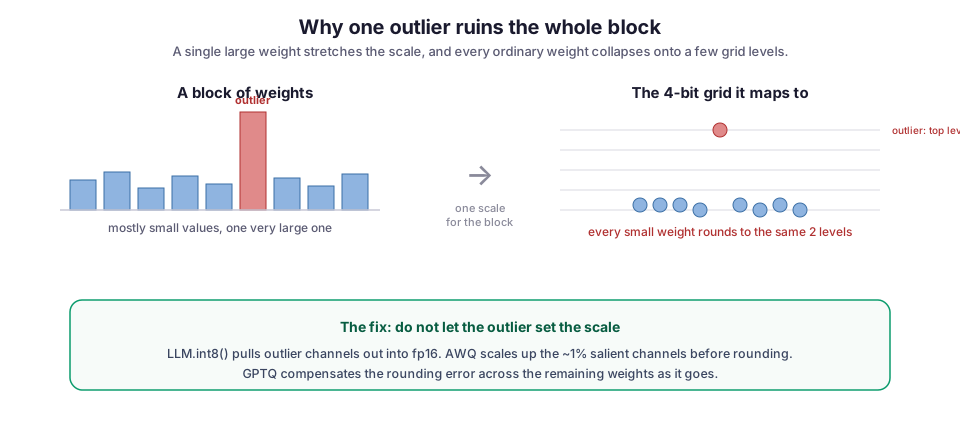
LLM.int8()‘s own fix is mixed-precision decomposition: pull the outlier channels out, compute those in fp16, quantize the rest to int8, and recombine. It keeps 8-bit inference lossless at scale, which is why bitsandbytes 8-bit became the default “just make it fit” button in Hugging Face Transformers.
The harder problem is 4-bit, and that is where GPTQ and AWQ come in. They are different answers to the same question: if you can’t round naively, how do you choose the 4-bit values that lose the least?
GPTQ: compensate for the error as you go
GPTQ (Frantar et al., ICLR 2023, arXiv:2210.17323) treats quantization as an error-minimization problem, one weight matrix at a time. It quantizes the matrix’s columns in sequence. After fixing each column, it updates the weights it hasn’t done yet to absorb the error that rounding just introduced. It decides how to do that using second-order (Hessian) information, a measure of how sensitive the layer’s output is to each weight, estimated from a small calibration set of example inputs. Each step’s rounding error is pushed forward and paid down by the remaining full-precision weights, instead of accumulating.
GPTQ was the paper that made 3- and 4-bit LLMs practical. It can quantize a 175B model in roughly four GPU hours with, in the authors’ words, negligible accuracy degradation. In practice you rarely run the algorithm yourself. You install auto-gptq or gptqmodel, point it at a calibration set, and get a checkpoint. The one input that matters is that calibration set, which brings its own failure mode (covered below).
AWQ: protect the weights that matter
AWQ (Lin et al., MLSys 2024, arXiv:2306.00978), which took that conference’s best-paper award, starts from a sharper version of the outlier observation. Not all weights matter equally, and the ones that matter most are identifiable. Look at the activation magnitudes, not the weight magnitudes, and roughly 1% of weight channels turn out to carry most of the model’s accuracy. Protect those and you protect the model.
The trick is that “protect” does not mean “keep in fp16.” AWQ scales up the salient (important) channels before quantizing and scales the corresponding activations down to match. Mathematically the two scalings cancel out, but they shift precision toward the channels that need it. Every weight still ends up 4-bit, so there is no mixed-precision bookkeeping at inference time. That makes the kernels simpler, and often faster, than schemes that carve out fp16 outliers.
On Llama-family models AWQ generally matches or beats GPTQ on perplexity (how well the model predicts held-out text; lower is better), and it has become the default I reach for first at 4-bit.
The two are not rivals so much as two tools with slightly different feel. GPTQ compensates for error after the fact; AWQ prevents it where it would hurt most. Both need calibration data, both land you at usable 4-bit, and on most models the gap between them is smaller than the gap between either one and naive RTN.
The formats you will actually type
Papers are one thing; the strings you pass to a loader are another. The map is smaller than it looks:
bitsandbytesships LLM.int8() 8-bit and the 4-bit NF4 format from QLoRA (Dettmers et al., NeurIPS 2023, arXiv:2305.14314). It is the zero-config path: setload_in_4bit=Truein Transformers and you are done, with no calibration step. It’s great for fine-tuning and quick loads, and generally a little behind GPTQ/AWQ on pure inference quality.- GPTQ / AWQ are the pre-quantized checkpoints you download for serving. vLLM and TGI (Hugging Face’s Text Generation Inference) load them directly and have kernels tuned for them. This is the production path for 4-bit serving.
- GGUF is the llama.cpp format, with its own “k-quant” schemes (Q4KM and friends) that mix bit widths across layers. It is the format for CPU, Apple Silicon, and edge devices, and what most local desktop tools run under the hood.
- FP8 is the hardware-native option on Hopper and newer GPUs: an 8-bit floating-point format the tensor cores multiply directly. Unlike weight-only int8, it can quantize activations too, so it actually speeds up compute instead of just saving memory.
If you only remember one sorting rule: bitsandbytes for convenience and training, GPTQ/AWQ for 4-bit serving, GGUF for CPU and local, FP8 when the silicon supports it.
Failure modes worth knowing
Perplexity holds while a specific skill quietly rots. Perplexity is the headline metric for quantization, and it is reassuringly stable. But it is an average over general text. It can barely move while the model gets measurably worse at the thing you actually deploy: code generation, multi-step math, long-context recall, or a non-English language underrepresented in the calibration data. Evaluate the quantized model on your task, not on a corpus average; this is the mistake I have seen cost the most.
4 bits is where it bites; 8 is usually free. int8 with a decent method is close to lossless on most models above a few billion parameters. int4 is where methods start to matter, and where small models (a 1-3B) can degrade sharply. If you are not memory-constrained enough to need 4-bit, don’t pay for it.
The calibration set has to look like your traffic. GPTQ and AWQ tune their choices on a sample of data. If you calibrate on generic web text and then run the model on your internal ops logs or a specific code style, you have optimized precision for a distribution you don’t serve. Use a few hundred samples that resemble real requests.
Quantized weights, full-precision everything else. Weight-only 4-bit shrinks the weights; the KV cache, activations, and CUDA context are untouched. On a long-context or high-batch workload the cache can outweigh the weights, so a 4-bit model can still run out of memory (OOM) at generation time. Quantizing weights and quantizing the cache are two separate savings.
Smaller does not always mean faster. Weight-only quantization helps single-stream decode, which is memory-bandwidth-bound, because you move fewer bytes out of HBM (the GPU’s high-bandwidth memory). But the dequantize-on-the-fly step adds compute. At large batch sizes, where serving becomes compute-bound rather than bandwidth-bound, a 4-bit weight-only model can be neutral or even slower than fp16; if throughput is your goal, benchmark it rather than assuming the smaller model wins.
What I would reach for
Start at the top of the ladder and stop as soon as the model fits:
- Try int8 first:
bitsandbytes, or FP8 if the hardware has it. It is close to free in quality and often the only step you need. - Drop to 4-bit only when you have to: when 8-bit still won’t fit, or when the memory saved pays for something real, like a bigger batch or a stronger base model on the same card. At 4-bit I default to an AWQ checkpoint, fall back to GPTQ, and calibrate both on data that resembles the actual requests.
For anything running on CPU or a laptop, I use GGUF k-quants. And whatever I pick, I run the task’s own eval on the quantized weights before it goes near production, because the average metric is exactly the one that hides the regression.
The reason any of this is worth the trouble comes back to the fixed cost. Quantization does not make the model better; it makes the model fit. Fitting is what lets you run a 70B where a 13B would have gone, or serve on one GPU where the invoice assumed two. On the HPC side of the CMS tooling, that is a budget question with real numbers attached. On Archi, it is the difference between a copilot that reasons well over long CMS logs and one that fits comfortably but answers worse. Most of the time, the stronger model, quantized to fit, is the one you want.
Diagrams by M. Hassan Ahmed, released under CC0. No external image was used in this post.